Password Managers: The Five-Minute Habit That Stops 80% of Hacks

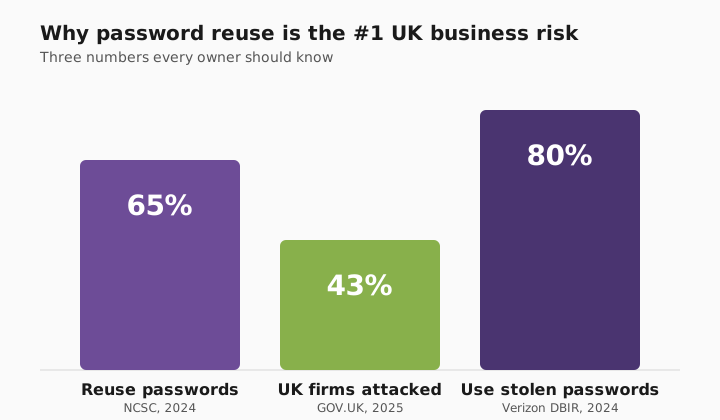
This week's tip is the one I wish every Greater Manchester business owner did first. It's free for home use, sits inside a properly hardened business stack at work, and stops roughly 80% of the credential-based attacks I see in the wild.
The £8,400 Post-it note
A Greater Manchester accountancy practice called us in last month after a nasty week. Their office manager — let's call him Mark — had 47 passwords to remember, and like most of us, he'd written them on a Post-it stuck under his keyboard.
A contractor was in fixing the air-con on the Tuesday. By Thursday, three of the firm's client accounts had been emptied of £8,400. The contractor wasn't the thief — but his mate, who he'd casually shown round the office, was.
By the time we walked through the door, the money was gone, the passwords were burned, and Mark was understandably mortified. Our job wasn't to lecture — it was to make sure it never happened again. Here's what we put in place, and what you can do today, for free, in five minutes.
Worth saying plainly: Mark's firm wasn't one of ours. If they had been, the password manager and MFA would already have been in place — and the Thursday phone call would never have happened.
Why this matters
- 65% of people reuse the same password across multiple sites — meaning one leaked password unlocks several accounts at once. NCSC Annual Review, 2024.
- 43% of UK businesses suffered a cyber attack in 2024/25, with phishing and credential theft topping the list. Cyber Security Breaches Survey 2025, GOV.UK.
The fix
The leading options all do the job well. We use Secure State™ as the umbrella for how we deploy these tools alongside MFA, device hardening and monitoring — but the password manager itself is the cornerstone.
Three tips you can act on this week
🏠 At home
Start with your email password. Change it to something long and random (the manager will generate one for you), then store it in the vault. Why email first? Because whoever owns your email can reset every other account you have. It's the master key — lock that door first.
🏢 At work
Roll out a business-grade password manager as one control inside a properly hardened cyber posture. It lets staff share logins safely, kills the password spreadsheet forever, and tells you instantly if a staff password has been leaked in a known breach. We package this with MFA, joiners/leavers and breach alerting as part of our Secure State offering — if you're rolling it out yourself, you're solving 20% of the problem.
🌍 For everyone
Switch on multi-factor authentication (MFA) on your top 5 accounts — email, banking, Amazon, work and one social. Even if your password leaks, the attacker still needs your phone. (We'll cover MFA properly next week.)
Which password manager should I pick?
Honest comparison — we've deployed all four for clients.
| Product | Free tier | Family | Business | Best for |
|---|---|---|---|---|
| Bitwarden | ✅ Genuinely useful | £30/yr (6 users) | £3/user/mo | Tech-comfortable home + SMB |
| 1Password | 14-day trial | £4.99/mo (5 users) | £6.40/user/mo | Polished UX, family + business |
| Apple Passwords | ✅ Built-in | iCloud Family | n/a | All-Apple households |
| Dashlane | Limited | £4.99/mo | £6/user/mo | VPN bundled in |
What this looks like locally
We've rolled password managers out across accountancy practices in Stockport, law firms in Altrincham, dental groups in Oldham and not-for-profits in Tameside. The pattern is always the same: an afternoon of setup, a 15-minute walkthrough per staff member, and one fewer thing keeping the owner up at night. Most clients are surprised at how quickly the team adapts — the auto-fill experience is genuinely faster than typing, so the resistance vanishes inside a week.
For a deeper dive on how this fits into a broader security baseline, see our piece on Cyber Essentials vs Cyber Essentials Plus — the password manager is one of the first controls assessors look for.
Frequently asked
Is Bitwarden safe to trust with all my passwords?
Yes. Everything is encrypted on your device before it's sent to Bitwarden's servers, so even Bitwarden's own engineers can't read your passwords. It's open-source and independently audited every year.
What happens if the password manager itself gets hacked?
Major breaches like LastPass in 2022 have led to encrypted vaults being stolen — but unless your master password is weak, the data stays unreadable. Use a long, unique master password and turn on MFA on the manager itself.
What if I forget my master password?
Most managers offer biometric unlock (Face ID, fingerprint) plus a recovery key you save during setup. Print the recovery key, keep it somewhere safe and offline, and you're covered.
Free or paid — what's the difference?
Bitwarden's free tier covers nearly everything a home user needs. Paid plans (£10-£40 per year) add family sharing, dark-web monitoring, and emergency access. For a business, a paid team plan is non-negotiable.
Can my whole team share a password without it being insecure?
Yes — that's exactly what business plans are for. You share an entry, not the password itself. Staff get access without ever seeing the underlying characters, and access can be revoked instantly when someone leaves.
Does it work with Microsoft 365 and Google Workspace?
Yes. All major managers integrate cleanly with both. They auto-fill the login prompts and remember any MFA secrets you've set up.
"One vault, forty-seven sleep-easy passwords." — Brett Casterton, Inology IT
I'm one form away.
I'm Brett at Inology IT — based in Tameside, looking after businesses right across Greater Manchester. Drop your details below and I'll be in touch within one working day.
Last reviewed by Brett Casterton, May 2026.