Smishing: The Charity That Lost Three Days to a Single Text Message

This week's tip is for anyone who's ever clicked a "missed delivery" text without thinking. The good news: spotting them is a learned skill, and the defence at work takes one meeting and one M365 tweak.
The £1.99 text that cost £4,500
A small Greater Manchester not-for-profit — the kind running one office, four staff, a couple of fundraising platforms and a Trustees board — called us in last month after a bad week. Their office manager had a text from "DPD" saying a parcel needed a £1.99 redelivery fee. She tapped the link, entered card details, then her M365 password on the page that followed.
By the next morning the attacker had read her inbox, set up a forwarding rule, and emailed two of the charity's largest donors with new bank details for their next gift. We caught it on day three.
By then, the donation platform was paused, the bank had frozen the account, two days of donor calls had to be made apologising, and a third day was spent on password resets, MFA rollout and a write-up for the Trustees. Three days of downtime — roughly £4,500 once you add lost donation processing, staff cover and the remediation work.
Worth saying plainly: this charity wasn't one of ours. If it had been, MFA and the M365 alerts behind it would already have caught the inbox rule on day one — and the donor emails would never have left the building.
Why this matters
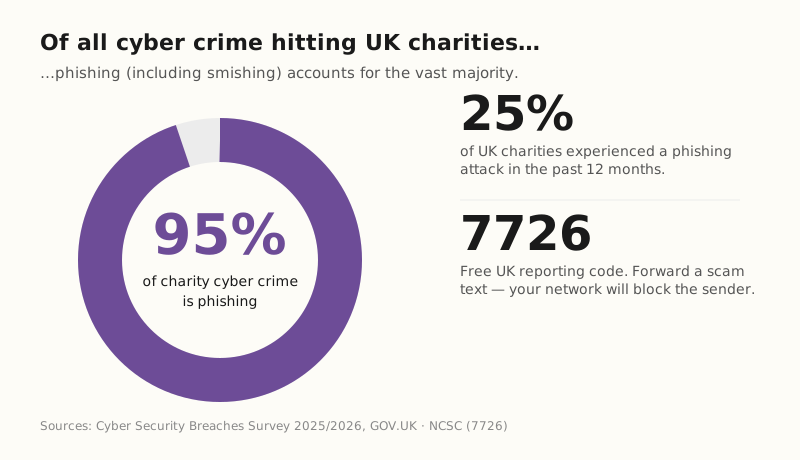
- 25% of UK charities experienced a phishing attack in the past year, and phishing now accounts for 95% of all cyber crime hitting the charity sector. Cyber Security Breaches Survey 2025/2026, GOV.UK.
- 7726 is the free UK scam-text reporting code, run by every major mobile network — forward a suspicious SMS and your provider can block the sender. NCSC — Report a scam text message.
The fix
We deploy this as part of our M365 Hardened posture — MFA on every account, inbox-rule alerts that flag silent auto-forwarding, conditional access policies that block sign-ins from suspicious locations, and the staff awareness training that turns "I didn't know what to do" into "I forwarded it to 7726 and told Brett".
Three things you can do this week
🏠 At home
Adopt the 30-second pause. Any text with a link asking for money, card details or a password — stop. Don't tap. Open the app or website you actually use (your bank, Royal Mail, HMRC) by going there directly. If the message is real, the same alert will be waiting for you inside the legitimate app.
🏢 At work
Turn on MFA on every M365 account as one control inside a properly hardened cyber posture. One stolen password is then worth almost nothing — the attacker still needs the second factor on the user's phone or authenticator app. We package this with inbox-rule alerts, conditional access and impossible-travel detection as part of our M365 Hardened offering — if you're rolling it out yourself, MFA alone is the single biggest security win you'll ever sign off.
🌍 For everyone
Forward suspicious texts to 7726 — it spells SPAM on the keypad. It's free, it's run by every major UK mobile network, and it lets your provider block the sender for everyone else. Takes ten seconds, helps everyone.
What actually stops a smishing attack?
Honest comparison — we've walked charities and small businesses through all four.
| Approach | What it does | Cost | Stops the £4,500 charity scam? |
|---|---|---|---|
| MFA on every account | Adds a second factor so a stolen password is useless | Built into M365 / Google Workspace | ✅ Yes — every time |
| Inbox rule alerts | Flags when an attacker sets up auto-forwarding | Part of M365 Hardened | ✅ Yes — catches the silent step |
| 30-second pause habit | Open the real app instead of tapping the link | Free | ✅ Yes — link is never tapped |
| Network anti-spam filter | Mobile network blocks known scam senders | Free with most networks | Partial — new numbers slip through |
What this looks like locally
We've rolled MFA and inbox-rule alerts out for not-for-profits in Tameside, community groups in Oldham, churches in Stockport and small charities across Greater Manchester. The whole thing usually takes one team meeting, one afternoon of setup and a follow-up call a week later. Trustees love it because it's the cheapest, biggest single security win they'll ever sign off.
For a deeper look at the security baseline this sits inside, see our piece on Cyber Essentials vs Cyber Essentials Plus — MFA on every account is exactly the kind of control the assessor looks for.
Frequently asked
How can I tell if a text is smishing?
Look for urgency, a link, and a tiny fee or threat. Real organisations almost never ask for payment or passwords by SMS. If in doubt, open the app directly instead of tapping the link.
Should I reply STOP to a scam text?
No. Any reply — even STOP — confirms your number is active. Forward the text to 7726 instead and delete the message.
What do I do if I've already tapped the link?
If you only opened the page and didn't enter anything, you're probably fine — just close it. If you typed a password, change it immediately on the real site, turn on MFA, and check inbox rules and forwarding settings. If you typed card details, ring your bank's fraud line now.
Does MFA really stop these attacks?
Almost always. Microsoft's own data shows MFA blocks more than 99% of account-takeover attempts. It's the single highest-impact security change a small charity or business can make.
Why does it cost a small charity £4,500 to lose three days?
Lost donation processing on paused fundraising platforms, staff cover while the office manager is locked out, donor calls to reassure regular givers, plus the remediation work — password resets, MFA rollout, Trustees write-up. It adds up faster than people expect.
Are charities really targeted, or is it just a numbers game?
Both. Most smishing is mass-scale and indiscriminate. But once an attacker realises they've landed inside a charity inbox with donor contacts, the attack quickly becomes targeted — fake bank-detail change emails to known donors are the classic next step.
"Pause 30 seconds. Open the real app, never the link. And turn MFA on at work today." — Brett Casterton, Inology IT
Last week's tip: AI Voice Cloning Scams — the 12-second call that cost £12,500.
I'm one form away.
I'm Brett at Inology IT — based in Tameside, looking after charities and small businesses right across Greater Manchester. Drop your details below and I'll be in touch within one working day.
Last reviewed by Brett Casterton, May 2026.