Kids, teens and shared family devices: share the screen, not the login

Last week we covered who to report a scam to and what happens after you press send. This week brings things closer to home: how to share laptops, tablets and consoles safely, and why the same rule protects shared PCs at work.
The Sunday afternoon school project
A Greater Manchester accountancy practice called us in last month after a director opened his laptop on Monday morning and knew straight away something was off.
His browser had three new toolbar extensions. His personal card showed £47 of game add-ons bought on Sunday afternoon. Worst of all, a client’s draft management accounts were sitting in the recycle bin.
Nobody had broken in. His eleven-year-old had asked to use the laptop for a school project, and because Dad was making Sunday dinner, he typed in his PIN and handed it over. One profile meant one set of saved cards, one OneDrive folder synced to the desktop, and full administrator rights to install whatever popped up.
We cleaned up the browser, restored the file and set up a separate Windows child profile in twenty minutes. Then we asked about the office, and found two reception PCs running on a single shared login called “FrontDesk”. We fixed those the same week.
Why this matters
Over half of children who play games online say they sometimes play with people they have never met in person, and 55% of parents believe their child spends too much time on screens (Ofcom, 2026).
In the workplace, shared logins fail UK security standards outright. Under the NCSC’s Cyber Essentials requirements, every user must sign in with unique credentials, and generic shared accounts are not compliant (IASME, 2026).
The fix
Account separation means giving every person on a shared device their own standard login, so their files, passwords, payment cards and permissions stay completely walled off from everyone else’s.
Most problems on shared kit happen because everybody uses the owner’s account, which almost always has administrator rights. An administrator account can install software, turn off security settings and view other files on the machine. A standard or child account cannot. Even Microsoft warns that if a child is set as an administrator on Windows, they can change or bypass Family Safety controls altogether.
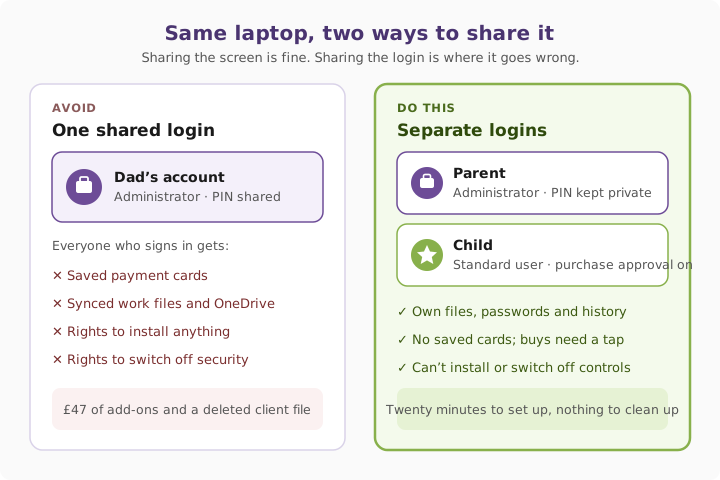
Apple, Google and Microsoft all build free family controls straight into their accounts. On iPhones and iPads, Apple’s Ask to Buy sends a prompt to the parent’s own screen whenever a child tries to download an app or make an in-app purchase. Google Family Link and Microsoft Family Safety do the same on Android, Chromebooks and Windows PCs. The one limitation is the iPad: Apple still treats an iPad as a single-person device with no multi-user profile switching, so a shared family iPad needs Screen Time restrictions locked behind a parent PIN instead.
At work, the fix is identical. Shared PCs on a trade counter, reception desk or shop floor are fine; shared logins are not. With proper managed IT support, staff sign into shared machines with their own credentials and fast user switching keeps it quick.
Three quick wins you can act on this week
🏠 At home
Give each child their own child account inside Apple Family Sharing, Google Family Link or Microsoft Family Safety, and check their Windows or Mac profile is set to “Standard user”, never “Administrator”. Turn on purchase approvals so free downloads and in-app spending ping your phone for a tap-to-approve first.
🏢 At work
Retire any generic logins like reception@, warehouse@ or info@ that more than one person signs into directly. Give every person their own named account, use shared mailboxes in Microsoft 365 when a team needs to read the same inbox, and pass a key check from our Cyber Essentials tip at the same time.
🌍 For everyone
Buying a tablet, phone, laptop or games console for Christmas? Open the box carefully a week early, run all the system updates, create the child account and lock down chat and spending limits before wrapping it. Christmas morning is the worst time to read forty screens of privacy settings.
How family and shared-device setups compare
| Device or platform | Built-in tool | Separate user profiles? | Purchase approval | Key catch to watch |
|---|---|---|---|---|
| Windows 11 PC or laptop | Microsoft Family Safety | Yes — separate sign-ins | Yes, for Microsoft Store | Child must be a Standard user, not Administrator |
| Mac | Apple Family Sharing | Yes — separate macOS users | Yes, via Ask to Buy | Keep your own admin password private |
| iPhone or child’s own iPad | Apple Family Sharing + Screen Time | Single user per device | Yes, via Ask to Buy | Child needs their own Apple Account |
| Shared family iPad | Screen Time restrictions | No multi-user profiles | Needs App Store password rules | Don’t leave work email or banking signed in |
| Android phone or tablet | Google Family Link | Yes — multiple users supported | Yes, for Google Play billing | Set approval to “All content”, not just paid |
| Shared workplace PC | Entra ID / Windows profiles | Yes — one login per staff member | Admin blocks installs | Generic logins fail Cyber Essentials |
What this looks like locally
We set up shared-device policies for accountancy practices, clinics, manufacturers and charities across Denton (M34), Ashton-under-Lyne (OL6), Stockport (SK1) and Trafford (M33). Whether it’s a director’s laptop doing double duty for GCSE revision or a warehouse PC shared across three shifts, the fix is always the same: separate logins, standard permissions, and five minutes of setup before someone deletes the wrong folder. You’ll find more plain-English guides in our Weekly Tech Tips.
Frequently asked
Can my child just use my Apple or Google account on their tablet?
Don’t do it. Sharing your own account gives them your messages, photos, saved passwords and payment cards, and stops parental controls working properly. Give them a child account linked to yours through Family Sharing or Family Link.
Why don’t iPads have separate user profiles like a laptop?
Apple designs iPadOS around one Apple Account per device. If a child has their own iPad, sign it into their child account. If the whole family shares one iPad, use Screen Time content and purchase restrictions locked with a passcode only the adults know.
How do I stop surprise in-app game purchases?
Turn on Ask to Buy in Apple Family Sharing, or set Google Play purchase approvals to “All content” in Family Link. Every download or coin pack sends an approval prompt to your phone before a penny is spent.
Can teenagers turn off parental controls themselves?
If their laptop profile is set as an Administrator, yes — they can remove restrictions or install unapproved apps. Make sure their Windows or Mac login is set to Standard user, and use a Screen Time PIN they don’t know.
Are shared logins allowed at work if it’s just a reception PC?
Not if you want to stay secure or pass Cyber Essentials. Every staff member needs their own login so you know who accessed what and can revoke one person’s access cleanly when they leave.
How do a team share an email address like info@ without sharing a password?
Use a shared mailbox in Microsoft 365 or Google Workspace. Each person signs in with their own email and password, and gets permission to read and send from the shared address without anyone sharing credentials.
“Sharing the screen is fine. Sharing the login is where the headaches start. Give everyone their own front door, and your stuff stays yours.” — Brett Casterton, Inology IT
Share the screen, not the login.
I’m Brett at Inology IT. Whether you’ve got directors working from home on family laptops or shared PCs on a reception desk or warehouse floor, we’ll set up clean, separate logins that keep your data safe and pass Cyber Essentials first time. Drop your details below and I’ll come back to you the same working day.
Last reviewed by Brett Casterton, November 2026.