QR code scams: how to spot a sticker that’s after your card details

Last week we covered passkeys and the login codes Microsoft is retiring. This week is a scam that needs no technology at all — just a printer, a sticker and somewhere busy.
“Why hasn’t my £20 donation arrived?”
A Greater Manchester charity called us last month after a long-standing supporter rang to ask why her £20 donation had never arrived.
She had scanned the QR code on one of their fundraising posters in a shopping centre and paid on her phone. The money left her account. It never reached the charity.
Someone had printed a sticker and placed it over the real code. The poster itself was untouched and looked completely normal. The payment page that opened carried the charity’s name and logo, lifted straight from their own website.
Nothing was hacked. No system was breached. A criminal with a printer had simply redirected the last thirty centimetres of the journey.
For the charity, the damage was not just the missing donation. It was a supporter who now hesitates before giving, and a fundraising team who had to check every poster they had in circulation.
If your organisation displays a QR code anywhere the public can reach it, somebody else can cover it.
Why this matters
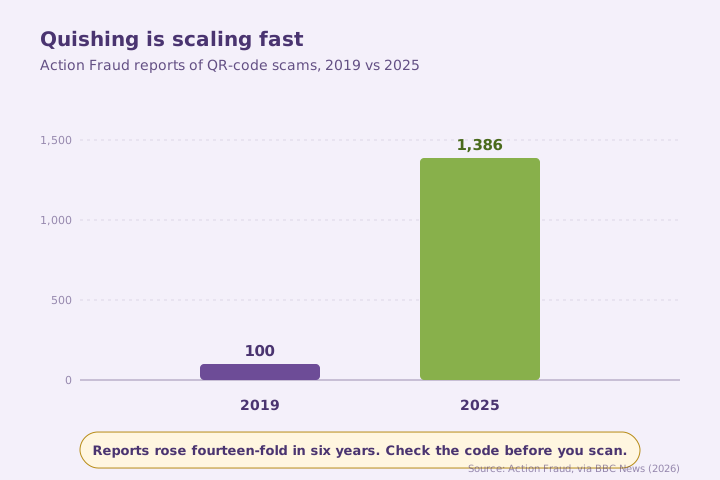
- Action Fraud recorded 1,386 reports of quishing in 2025, up from just 100 in 2019, with car parks now among the most common locations for the scam. BBC News (2026): How to avoid QR code parking scams.
- An investigation by the Bureau of Investigative Journalism found that 123 of 373 responding councils confirmed their car parks had been targeted in the past year, with more than 20 NHS hospitals also affected. Parking Network (2026): How UK councils can stop car park QR code scams.
The fix
Everything you learned about fake websites applies here, with one extra difficulty: you cannot read a QR code with your eyes, so you cannot check where it goes before you scan. That makes the physical check the important one. Is this code part of the sign, printed into it — or is it a sticker sitting on top?
Scan with the camera app your phone came with rather than a downloaded QR reader, since third-party scanner apps add their own risk of malware and misleading adverts. Your camera will preview the web address before it opens anything. Read that preview. If it isn’t the organisation you expected, stop. The NCSC’s phishing guidance is worth ten minutes of anyone’s time.
Three quick wins you can act on this week
🏠 At home
Before scanning anything in public, look at the code itself. A sticker placed over an existing code, sometimes slightly at an angle or peeling at a corner, is the classic sign. In open spaces like car parks the risk is higher than in a pub or restaurant, simply because it’s easier for someone to tamper with unattended.
🏢 At work
Audit your own QR codes. Donation posters, table menus, reception signage, parking instructions, event flyers — anywhere the public can physically reach one. Check them on a schedule, print codes into artwork rather than applying them as stickers, and tell staff who to report a suspected fake to.
🌍 For everyone
Prefer another payment route. Contactless, a card reader, or an official app downloaded from your phone’s app store are all safer than a code on a machine. If you must scan, read the address preview, and never enter card details on a page you reached by scanning something in the street.
If you think you’ve scanned a fake
Act quickly and in this order:
- Stop entering information and close the page.
- Screenshot the web address and note exactly where the code was.
- Call your bank on the number printed on the back of your card.
- Report it to Action Fraud, and tell the council or venue so the sticker gets removed.
How the payment options compare
Honest comparison — the routes in most common use, and how easy each is for a criminal to intercept.
| How you pay | Risk of a fake intercepting you | Notes |
|---|---|---|
| Contactless or chip and PIN | ✅ Lowest | No web page involved at all |
| Official app from the app store | ✅ Low | Downloaded by you, not by a link |
| Typing the address from the sign | ✅ Low | You control where you land |
| Scanning a QR code printed into the sign | ⚠️ Moderate | Still check the address preview |
| Scanning a QR sticker applied on top | ❌ Highest | Treat as untrusted until proven otherwise |
What this looks like locally
We work with charities, accountancy practices, law firms and manufacturers across Denton (M34), Ashton-under-Lyne (OL6), Stockport (SK1) and Trafford (M33). Quishing is the rare scam where the fix is partly physical: walk round your own premises, look at every QR code a member of the public could touch, and ask whether you would spot a sticker over the top of it. Most people find at least one they would not.
If you’d like this built into how the practical parts of your security are run — staff awareness, payment verification and the boring checks that stop a convincing scam from working — it’s all part of a SecureState review.
Frequently asked
What is quishing?
Phishing carried out through a QR code. Scanning it takes you to a fraudulent website — often a payment page — rather than the legitimate one you expected.
How can I tell if a QR code is fake?
Look for a sticker applied over an existing code, placed at a slight angle, peeling, or lacking the branding and instructions around it that the genuine sign has.
Is it safe to scan QR codes in restaurants?
Generally safer than in open public spaces, because codes indoors are harder to tamper with unnoticed. Still check whether the code is printed into the menu or stuck on.
Should I use a QR scanner app?
No. Use the camera app your phone came with. Third-party scanner apps increase the chance of malware or misleading adverts, and your camera already previews the address.
What do I do if I’ve paid through a fake QR code?
Call your bank immediately using the number on the back of your card, report it to Action Fraud, and tell the venue or council so the sticker can be removed.
How do I protect my business’s own QR codes?
Print codes into your artwork rather than applying stickers, check public-facing codes on a regular schedule, and give staff a clear route to report anything that looks added.
“This is the rare scam where the fix is physical. Walk round, look at your own codes, and ask whether you’d notice a sticker on top of one.” — Brett Casterton, Inology IT
Let’s tighten up the practical stuff before a convincing scam gets through.
I’m Brett at Inology IT. We help Greater Manchester businesses and charities tighten up the practical stuff — staff awareness, payment verification, and the boring checks that stop a convincing scam from working. Drop your details below and I’ll come back to you the same day.
Last reviewed by Brett Casterton, September 2026.