Fake websites: how to spot a convincing copy before you pay

Last week we covered removing access when someone leaves — closing the doors behind them. This week is about the doors that were never yours to begin with: websites built to look exactly like the ones you trust. The good news is that one habit defeats almost all of them, and it takes about five seconds.
“I renewed a subscription online — and it never arrived.”
A Greater Manchester dental group called us after a receptionist renewed a professional subscription online and never received it.
She had done nothing unusual. She searched for the organisation, clicked one of the top results, and arrived at a page that looked entirely correct — same logo, same colours, same layout, live chat in the corner. She entered the practice card details and paid.
The site was a copy. The web address differed from the real one by a single character, buried in the middle where nobody reads.
By the time the charge appeared on the statement, the card details had been used elsewhere. We helped them cancel the card, check what else had been entered on that machine, and reset a password the same member of staff had reused.
Nothing about this was careless. It was a busy person, a convincing page, and an address nobody had a reason to doubt. That is exactly the gap criminals build for — and it is why how you arrive at a website now matters more than how the website looks.
The answer is not to memorise every possible scam URL. It is to change your route in — and let the site prove itself before you type a single character.
Why this matters
- Consumer: National Trading Standards reported that 6.4 million UK shoppers were scammed after clicking on a fake advert, and advised people to look beyond reviews and star ratings, avoid buying through ads, and treat unknown websites with caution. National Trading Standards (2025).
- Business: Phishing affected 38% of UK businesses in the 2025/26 Cyber Security Breaches Survey — and a phishing email’s job is almost always to deliver you to a convincing fake login page. UK Government: Cyber Security Breaches Survey 2025/26.
The fix
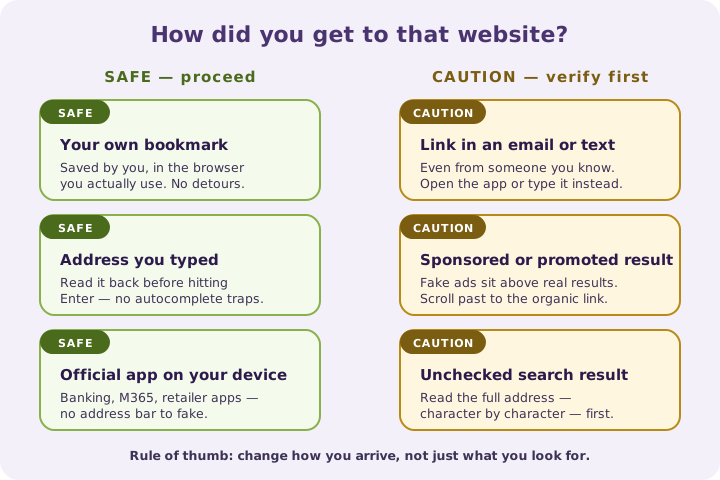
HTTPS and the padlock confirm only that traffic between your device and that server is encrypted. A criminal can obtain that in minutes. What actually protects you is your route in: reaching a site through a bookmark, an official app, or an address you typed yourself, rather than through a link, advert or search result you did not verify. The NCSC’s guidance is consistent — don’t use the numbers or links in a message; use the details from the organisation’s official website.
Three quick wins you can act on this week
🏠 At home
Read the entire web address before entering card details, slowly and left to right. Look for extra words, hyphens, swapped letters or an unexpected ending. Be sceptical of prices far below everywhere else, and pay by credit card where you can for stronger protection if something goes wrong.
🏢 At work
Never enter Microsoft 365 credentials on a sign-in page you reached from an email link. Open a new browser tab and go in the way you always do. Apply the same rule to supplier portals, banking and payroll systems, and tell staff that “the page looked right” is not a check.
🌍 For everyone
Change how you arrive, not just what you look for. Bookmark the sites that hold your money or your identity, use official apps, and type addresses yourself. If you have already entered details on a suspicious site, change that password immediately, contact your bank, and report the site to the NCSC.
How you reached the site — risk at a glance
Honest comparison — the routes we see most often, and the safest response to each.
| How you reached the site | Risk level | What to do |
|---|---|---|
| Your own bookmark or official app | ✅ Low | Proceed normally |
| Address you typed yourself | ✅ Low | Check spelling, then proceed |
| Link in an unexpected email or text | ❌ High | Don’t use it — go your own way |
| Sponsored advert or promoted result | ⚠️ Elevated | Leave and search or type the address directly |
| Link from social media or a marketplace chat | ⚠️ Elevated | Verify the seller and site independently |
| Search result you didn’t check the address on | ⚠️ Elevated | Read the full address before entering anything |
What this looks like locally
We support dental groups, accountancy practices, law firms and manufacturers across Denton (M34), Ashton-under-Lyne (OL6), Stockport (SK1) and Trafford (M33). Fake-site incidents almost never arrive as dramatic hacks — they show up as a card charged for a subscription that never appeared, or a Microsoft 365 password typed into a page that looked exactly like the real one. Both are fixable, and both are far cheaper to prevent than to unpick.
If you’d like this built into how your Microsoft 365 tenant is looked after — tighter sign-in protection, safer supplier processes and practical staff awareness that sticks — it’s all part of a SecureState review.
Frequently asked
How do I know if a website is fake?
Read the full address carefully for extra words, hyphens or swapped characters, be wary of prices far below the market, and check how you arrived. If you clicked an advert or an emailed link, leave and reach the site your own way instead. See NCSC guidance on spotting cyber attacks.
Does the padlock mean a website is safe?
No. The padlock and HTTPS mean the connection is encrypted, not that the owner is trustworthy. Criminals routinely obtain certificates for scam sites.
I entered my card details on a fake site — what now?
Contact your bank or card provider immediately, cancel the card, and watch for further transactions. If you also entered a password, change it on the real site straight away and anywhere else you reused it — a password manager will also warn you when a login page isn’t the real domain.
How do I report a fake website in the UK?
Report suspicious websites to the NCSC’s scam website reporting service, and report fraud or attempted fraud to Action Fraud.
Can a fake site look exactly like a real Microsoft 365 login?
Yes — cloned Microsoft 365 sign-in pages are among the most common. Always start from your own bookmark or app, and treat any unexpected prompt to “sign in again” as a reason to stop and check.
Are adverts at the top of search results safe to click?
Not automatically. Fake adverts are a known route into scam sites, so avoid buying through ads and go to the retailer directly instead.
“The padlock tells you the connection is private. It tells you nothing about who is on the other end of it.” — Brett Casterton, Inology IT
Let’s give your staff one simple rule they’ll actually remember.
I’m Brett at Inology IT. We help Greater Manchester businesses lock down Microsoft 365 sign-ins, filter the emails that lead to fake sites, and give staff one simple rule they’ll actually remember. Drop your details below and I’ll come back to you the same day.
Last reviewed by Brett Casterton, September 2026.