Scam phone calls: how to spot the fakes and say no

Last week we talked about locking down your router. This week it's the other side of the line — the person on the phone. Same goal: keep your money and your data safe, at home and at work.
The bank call at 5.20pm
A Greater Manchester couple — both working, one just off the train home — get a call at 5.20pm on a Tuesday. Caller ID says it's their bank. The voice is calm, professional, and says the "fraud team" has spotted a suspicious card transaction in Birmingham. Do they recognise a £480 charge from a hotel? They don't. Panic sets in.
The caller "reads out" a case reference, asks a couple of security questions they already seem to half-know, and then explains that to freeze the card and reverse the payment they'll send a code by text — please can they read it back?
They read the code back. Then a second one. By Monday morning £4,800 has moved out of the joint account into a "safe account" that turns out to be anything but. The real bank confirms none of the calls came from them.
Same script hits businesses. A Greater Manchester accounting practice had the same call land on their finance team last quarter — "your Barclays fraud team" — this time asking for online-banking access to "verify a payment run". Same panic, same urgency, same rescue: hang up, ring back on the number printed on the card.
Why this matters
- At home, scam calls routinely imitate banks, HMRC, delivery firms and tech companies, and rely on people reacting quickly rather than stopping to check. UK Finance figures show authorised push payment (APP) fraud — the category most bank scam calls sit inside — cost consumers over £340m in the last year alone.
- At work, "IT support" and "Microsoft" style calls can trick staff into handing over passwords or installing remote-access tools that give criminals a route into company systems. Action Fraud consistently ranks "computer service fraud" among the top losses reported by UK small businesses.
The fix
For businesses, this is where a proper M365 Hardened posture starts to earn its keep — MFA on every account, staff awareness training, and a written phone policy that means the answer to "can you just install this quick tool for me?" is always no. It's also exactly the kind of control a Cyber Essentials assessor looks for.
Three things you can do this week
🏠 At home
If "the bank", HMRC or your broadband provider calls unexpectedly, thank them, hang up, and ring back using the number on their website or your card. Never read out one-time security codes from texts or apps to someone who called you.
🏢 At work
Make it policy that nobody ever gives passwords, MFA codes or remote-access details to anyone who rings them. If "IT support" calls, staff should be told they can — and must — verify through an internal channel first. We build this into the awareness pack for every client on our M365 Hardened posture.
🌍 For everyone
Slow everything down. Scam calls lean on urgency. If a caller insists you act "right now", or tries to keep you on the line when you say you'll call back on the official number, treat that as proof they're not genuine.
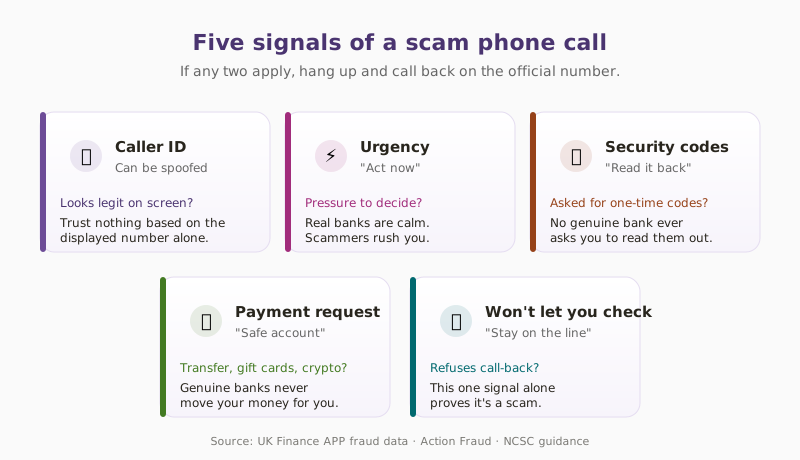
Genuine call or scam? Five signals to read
Honest comparison — the same five behaviours split a real call from a fake one, almost every time.
| Signal | Genuine call | Scam call |
|---|---|---|
| Caller ID | May show "unknown" or a bank main number | Can be spoofed to look like any official number |
| Urgency | Calm, explains options, no time pressure | Pushes "act now" or "you'll lose your money" |
| Security codes | Ask you to confirm details already known | Want full codes read from texts or authenticator apps |
| Payment requests | Direct you to log into your normal channels | Ask for transfers to a "safe account" or gift cards |
| Reaction to checks | Happy for you to hang up and call back | Try to keep you on the line at any cost |
What this looks like locally
We've walked accountancy practices, healthcare providers and small charities across Tameside, Oldham, Stockport and the wider Greater Manchester area through exactly this scenario. It shows up in both directions — the office manager taking a "bank fraud" call, and the finance clerk taking a "Microsoft engineer" call. The fix is the same: a written phone policy, MFA on every account, and a team culture that says "hang up and check" is never rude.
For a deeper look at the security baseline this sits inside, see our piece on Cyber Essentials vs Cyber Essentials Plus — the phone-scam controls above are exactly what the assessor asks about.
Frequently asked
How do I know if a call from my bank is real?
You don't — not while the caller is still on the line. Real banks never mind if you hang up and ring back on the number on your card. If the caller tries to talk you out of that, or gives you a different number to call, it's a scam.
Should I trust the number that shows up on my phone?
No. Caller ID is easy for a scammer to spoof so that it displays as your bank's real number, HMRC or even a local business. Never let the number on the screen be the reason you trust the call.
What should I do if I think I've given details to a scam caller?
Ring your bank's fraud line on the number printed on your card (not any number the caller gave you) as fast as possible — most UK banks can freeze accounts and block payments in minutes. Then change the password for anything else you use with those details, and report it to Action Fraud on 0300 123 2040 or actionfraud.police.uk.
Are businesses targeted by phone scams too?
Yes — and often more successfully. "IT support", "Microsoft engineer" and "your accountant's assistant" calls are used to trick staff into installing remote-access tools or handing over passwords. Once a criminal has remote access to a work machine, they can read email, steal files and move money.
Can my phone provider stop scam calls?
They can help, not solve. Most UK mobile networks now offer free scam-call filtering — check your provider's app. You can also register with the Telephone Preference Service to reduce legitimate marketing, and forward suspicious calls' numbers to 7726 by text.
Is it safe to say "yes" on a suspicious call?
The "yes" recording scam is largely a myth in the UK — a recorded "yes" on its own can't authorise a bank transfer. What matters is what you tell them next. If the call feels wrong, just hang up. You don't owe a stranger politeness.
"Scam calls don't need you to be gullible. They just need you to be busy. If you get to the end of the day and someone rings about 'urgent fraud', your best defence is three words: I'll call back." — Brett Casterton, Inology IT
Last week's tip: Home router security — three tiny changes that protect everything on your Wi-Fi.
I'm one form away.
I'm Brett at Inology IT — based in Tameside, looking after families and small businesses right across Greater Manchester. Drop your details below and I'll be in touch within one working day.
Last reviewed by Brett Casterton, July 2026.