Battery life tips: make your phone and laptop last longer

This is an interim Tech Tip because nobody needs a dead phone halfway through a Saturday — or a laptop that gives up before the last client meeting. Battery life is not just about buying newer kit. A few built-in settings can make today last longer, while sensible charging habits can help the battery itself age more slowly.
Why so many laptops died halfway through site visits
A Greater Manchester engineering firm asked us why so many staff laptops were running out of battery halfway through site visits. Their first instinct was to replace the fleet.
A few laptops were genuinely old. But most had a simpler problem: every setting was working against the battery.
Screens stayed at maximum brightness. Devices remained awake between meetings. Browser tabs, Teams, cloud synchronisation and background apps kept running. Staff also used phone hotspots for long periods in places with poor signal — one of the fastest ways to make a phone warm and drain its battery.
We started with the easy fixes: shorter sleep timers, Windows Energy Saver, sensible brightness and a quick review of battery-hungry apps. Staff who needed a full day on site were shown how to check battery reports and take a proper charger or power bank.
The result was not magic. It was simply less wasted power. Your phone and laptop are doing useful work all day. The trick is stopping them from doing pointless work when you are not looking.
Why this matters
- Consumer: Google says that high screen brightness, long navigation sessions, mobile hotspots, GPS, video and graphics-heavy apps can all reduce Android battery life; Battery Saver, lower brightness and app restrictions can help. Google Help: Get the most life from your Android device's battery.
- Business: Microsoft's Windows guidance recommends shorter screen and sleep timeouts, Energy Saver and "Best power efficiency" to reduce battery use by limiting background activity and display power consumption. Microsoft Support: Power settings in Windows 11.
The fix
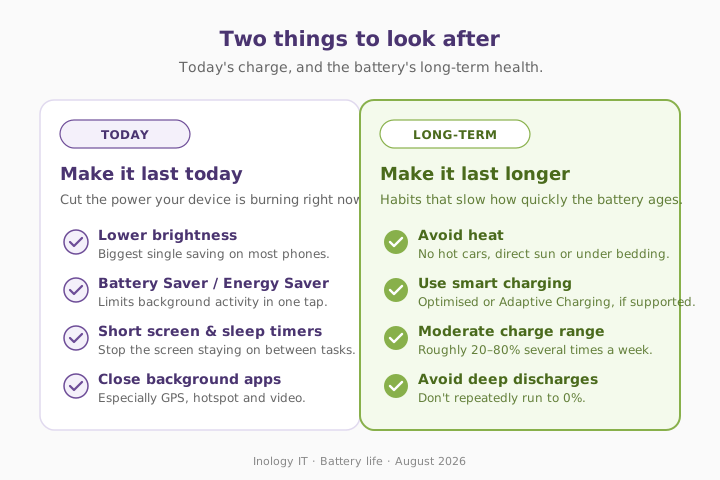
For better battery life today, reduce unnecessary power use. For better battery health over months and years, avoid heat, use the device's smart-charging features, and avoid repeatedly leaving lithium-ion batteries completely flat or fully charged for long periods where practical. Microsoft and Apple both publish plain-English guidance on this.
Three quick wins you can act on this week
🏠 At home
Turn on Low Power Mode or Battery Saver, reduce brightness, and look in your phone settings for the apps using the most battery. Switch off Bluetooth, location or hotspot use when you do not need them. Keep devices out of hot cars and direct sun.
🏢 At work
On Windows, go to Settings → System → Power & battery. Set Power Mode to Best power efficiency, turn on Energy Saver, and shorten screen-off and sleep timeouts for battery use. Make battery health and charger checks part of replacing older mobile kit.
🌍 For everyone
Avoid deep daily discharges where you can. Microsoft recommends keeping lithium-ion batteries in a moderate range, roughly 20–80 percent, several times a week, and avoiding high-temperature charging or storage.
What actually helps
Honest comparison — the habits that show up most often when we sort out battery complaints for mobile staff.
| Habit | Helps today's battery life | Helps long-term battery health | Effort |
|---|---|---|---|
| Lower brightness | ✅ High | ⚪ Limited | Low |
| Battery Saver / Low Power Mode | ✅ High | ⚪ Limited | Low |
| Shorter screen and sleep timers | ✅ Medium | ⚪ Limited | Low |
| Close battery-hungry background apps | ✅ Medium | ⚪ Limited | Low |
| Avoid heat | ✅ Medium | ✅ High | Low |
| Smart charging / moderate charge range | ⚪ Limited | ✅ High | Low |
| Replace a degraded battery or old device | ✅ High | ✅ High | Medium |
What this looks like locally
We support mobile staff across Tameside, Denton (M34), Stockport (SK1), Ashton-under-Lyne (OL6) and Trafford (M33), including engineers, accountancy teams and professional-services firms that spend as much time on the road as at a desk. Battery problems are often a mix of ageing hardware and simple settings: bright screens, no sleep policy, worn chargers, background apps and devices left cooking in vans.
If a laptop refresh is on the horizon, our managed IT support team can build battery health checks into the standard user review — or see when an old device is no longer safe or cost-effective and keeping devices current for performance and security.
Frequently asked
Why does my phone battery drain so fast?
Common causes include high screen brightness, poor mobile signal, GPS, video, hotspots, background apps and an ageing battery. Check your phone's Battery settings to see which apps use the most power. Google Help has a full checklist for Android.
Does Low Power Mode damage my phone battery?
No. It reduces background activity and some non-essential features to help the battery last longer for the day. Apple says Low Power Mode reduces background activity on iPhone and iPad when battery levels are low.
Should I charge my phone to 100 percent?
You can when you need a full day, but keeping a lithium-ion battery fully charged for long periods can contribute to wear. Where practical, use Optimised Charging, Adaptive Charging or a charge limit if your device supports it.
Is it bad to let my laptop battery run flat?
Frequent deep discharges can speed up battery degradation. Microsoft recommends avoiding frequent deep discharges and keeping the battery within a moderate charge range where possible.
Why does heat damage a battery?
High temperatures can permanently reduce lithium-ion battery capacity and make a device degrade more quickly. Avoid charging or storing devices in direct sunlight, hot cars or under bedding.
How do I save battery on a Windows laptop?
Use Best power efficiency or Energy Saver, reduce brightness, shorten screen and sleep timeouts, and turn off Wi-Fi or Bluetooth when you do not need them. See Microsoft's battery-saving tips for Windows.
"Most battery problems are not one dramatic fault. They are a bright screen, a dozen background apps and a phone quietly working overtime all day." — Brett Casterton, Inology IT
Let's sort the mobile fleet — same day.
I'm Brett at Inology IT. We help Greater Manchester businesses keep staff devices reliable — from battery-health checks and power settings to replacing ageing laptops before they become a problem on the road. Drop your details below and I'll come back to you the same day.
Last reviewed by Brett Casterton, August 2026.