Software updates and patching: the five-minute habit that stops most hacks
Last week we covered public Wi-Fi and VPNs — staying safe on networks you don't control. This week is about the holes already sitting inside your own devices: the updates you keep putting off, and the five-minute habit that closes them before anyone walks through.
The £30,000 update nobody installed
A Greater Manchester engineering firm called us in last month after the worst weekend their MD had ever had. Ransomware had locked everything — drawings, accounts, the lot. The criminals wanted £30,000. We traced how they got in within two hours: a server that hadn't had a Windows update applied in fourteen months.
The patch that would have closed the exact hole they walked through? Released by Microsoft the previous July. Free. Sitting in the update queue the entire time.
Nobody had ignored it on purpose. The server was "running fine," so nobody touched it. Restarts felt risky — what if something broke? That nervousness cost £30,000 in recovery, three days of downtime, and a very awkward conversation with their professional indemnity insurer.
The fix would have taken twenty minutes on a Saturday morning. "Running fine" is exactly when you should be patching.
Worth saying plainly: that firm wasn't one of ours at the time. If it had been, that server would have been on a tested monthly patch cycle from day one — and that weekend would never have happened.
Why this matters
- Consumer: Most successful attacks on home devices target known weaknesses for which fixes already exist — keeping your phone, laptop and apps updated is the single biggest thing you can do as a home user. NCSC: Cyber security advice for you & your family.
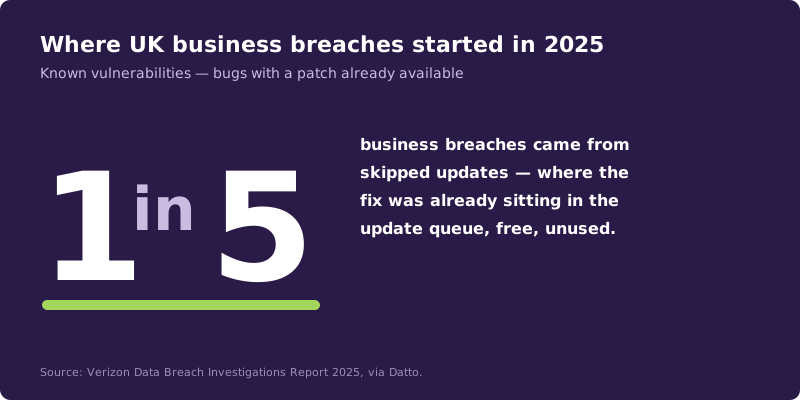
- Business: One in five UK business breaches in 2025 came from the exploitation of known vulnerabilities — bugs with patches already publicly available. Verizon Data Breach Investigations Report 2025, via Datto.
The fix
The fix at home is to let updates install themselves — turn on automatic updates and let the device do the work overnight. The fix at work is a defined patch cadence, tested and applied on a schedule rather than left to whoever remembers. We deliver this as managed patching, part of our managed IT support, alongside Secure State for the wider cyber posture.
Three things you can do this week
🏠 At home
Turn on automatic updates for your phone (Settings → Software Update), your laptop (Windows Update or macOS Settings), and your apps (App Store / Play Store auto-update). Set the install window to something like 2am when you're asleep, and the device handles itself.
🏢 At work
Don't dismiss the "restart to install updates" prompt every afternoon. Schedule a weekly five-minute restart, ideally end of day. For servers and business-critical systems, ask your IT provider how often patches are tested and applied — there should be a defined cadence, monthly at minimum. We run this as managed patching so it's never left to chance.
🌍 For everyone
If a device is too old to receive updates — an iPhone that's stopped getting iOS updates, an unsupported Windows 10 machine, an old router — it's not "still working fine". It's a risk. Replace it.
Which update approach actually protects you?
Honest comparison — this is the advice we give homes and businesses alike.
| Update approach | Coverage | Effort | Survives a known exploit? | Good for |
|---|---|---|---|---|
| Auto-updates on, scheduled overnight | High | None | ✅ Yes | Most homes and small offices |
| Manual updates whenever you remember | Medium | Variable | ⚠️ Maybe | Tech-confident individuals |
| "Remind me later" forever | None | None | ❌ No | Nobody — yet far too common |
| Managed patching (IT provider) | Highest, tested | None on your side | ✅ Yes, with rollback | Any business with 5+ staff |
| End-of-life device, no updates | Zero | None | ❌ No | Replace it |
What this looks like locally
We've patched and audited servers, laptops and phones across Tameside, Stockport (SK1), Ashton-under-Lyne (OL6), and Sale (M33). The single most common cause of a serious incident we get called to? A device or server that was "running fine" and hadn't been updated in a year. It's almost never something exotic. It's almost always a known patch that nobody got round to installing.
Frequently asked
What is a software update and why does it matter?
It's a free fix from the company that made your device or app. Most updates are security patches that close holes criminals already know about — skipping them leaves the door open.
Are software updates really that important?
Yes. One in five UK business breaches in 2025 used known vulnerabilities that already had patches available. At home it's the cheapest cyber protection you'll ever get — and for businesses, keeping software patched is a baseline requirement for Cyber Essentials certification.
What happens if I don't update my phone?
Eventually, banking apps stop working, your phone stops getting security fixes, and known weaknesses stay open. Old, unpatched phones are a favourite target for malware and account takeovers.
Should I let updates install automatically?
For phones, laptops and most apps — yes. For business servers and critical systems, your IT provider should test and stage updates so they don't break anything. Industry guidance on staged patch management says the same.
How often should businesses patch?
A monthly patch cycle at minimum, with critical security fixes applied within days, not weeks. Many MSPs (including us) automate this with managed patching tools.
My device says it can't update anymore — what do I do?
Replace it. Once a device stops receiving updates it's permanently exposed. No security software can fix the underlying holes.
"The most expensive ransomware job I've ever cleaned up came from a free update that nobody installed. Five minutes of patching beats five days of cleanup, every single time." — Brett Casterton, Inology IT
Let's find out.
I'm Brett at Inology IT. We run free patching audits for Greater Manchester businesses — we'll tell you exactly which servers, laptops and bits of software are behind on updates, what risk that creates, and how fast we can get you current. Drop your details below and I'll come back to you the same day.
Last reviewed by Brett Casterton, June 2026.