Email rules: the quiet hijack that survives a password change

Last week we covered file links that stay open long after they’re needed. This week is about something similar inside your email: a setting a criminal adds once, which keeps working after everyone thinks the problem is fixed.
The £38,000 that went to the wrong account
A Greater Manchester manufacturer called us after a long-standing customer asked why a £38,000 payment hadn’t been acknowledged. The customer had paid. The manufacturer had never received it.
Three weeks earlier, a member of the accounts team had entered her password into a convincing fake Microsoft login page. Someone noticed an odd sign-in, the password was reset, and as far as anyone knew, that was the end of it.
When we checked her mailbox, we found two rules she hadn’t created. The first forwarded a copy of any email containing “invoice”, “payment” or “remittance” to an outside Gmail address. The second moved replies from that customer straight into the RSS Feeds folder, which nobody ever opens.
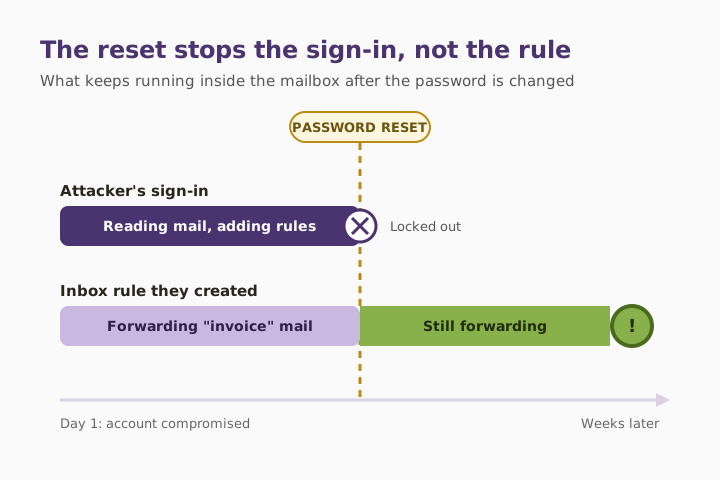
The password reset had locked the criminal out, but they no longer needed to get in. The rules kept sending them exactly what they wanted. They waited for a genuine invoice, sent a copy of it with new bank details, and the customer’s question about the change went into a folder nobody read.
We removed the rules, checked every other mailbox in the business, and blocked automatic forwarding to outside addresses for everyone. That took about an hour. Trying to recover the money took a good deal longer.
Why this matters
- Action Fraud figures show invoice fraud victims lost £3,908,086 in September 2025 alone, from just 83 cases, an average of more than £47,000 each. Invoice fraud made up 85% of all payment diversion losses that month. National Crime Agency (2026): NCA and NatWest launch campaign to protect against invoice fraud.
- Microsoft’s own security guidance says malicious inbox rules are widely used in business email compromise, and that attackers commonly create them to send mail automatically to an outside address. Microsoft Learn (2026): alert classification for suspicious inbox forwarding rules.
The fix
That’s why this attack lasts so long. Most people think of a hacked account as someone logged in, so they lock the door by changing the password, signing out every session and turning on stronger sign-in. All of that is right, and all of it leaves the rule untouched. The rule keeps forwarding, hiding or deleting mail until someone finds it.
There are two places to check. One is the rules list in Outlook or your webmail. The other is a separate forwarding setting at the mailbox level, which doesn’t appear in the rules list at all. In Microsoft 365, your admin can check both for every mailbox at once and block forwarding to outside addresses across the business. If you’re not sure that’s been done, it’s a quick thing to check as part of your cyber security setup.
Three quick wins you can act on this week
🏠 At home
Open your email settings and look for “Rules” and “Forwarding”. In Outlook.com and Gmail, both are in the main settings menu. Delete any rule you didn’t create, especially ones that forward mail, delete it or move it into a folder you never look in.
🏢 At work
Make “check rules and forwarding” a standard step whenever an account might have been compromised, alongside the password reset. Block automatic forwarding to outside addresses for the whole business, and allow it only for the few people who genuinely need it. Ask for an alert whenever a new forwarding rule is created.
🌍 For everyone
Treat any change of bank details as suspicious until you’ve confirmed it. Phone the supplier or customer on a number you already have, not one from the email asking for the change. A real supplier won’t mind you checking. The NCSC’s business payment fraud guidance covers what to do if money has already gone.
What to check after a compromised account
- Reset the password and sign the account out of every device and session.
- Open the rules list and delete anything that forwards, deletes, or moves mail somewhere unusual.
- Check the separate mailbox forwarding setting, which isn’t shown in the rules list.
- Check the recovery phone number and email address haven’t been changed.
- Look through sent and deleted items for anything sent in your name.
- Warn your regular contacts if fake invoices or payment requests may have gone out.
Rules that should make you stop
| What the rule does | Why a criminal sets it up | Normal for most people? |
|---|---|---|
| Forwards all mail to an outside address | Gives them a copy of everything | Rarely |
| Forwards mail containing “invoice” or “payment” | Spots payments in progress | Almost never |
| Moves a contact’s replies into an unused folder | Hides questions about a fake invoice | No |
| Deletes security or sign-in alerts | Stops you noticing the break-in | No |
| Has a blank or one-character name | Hard to notice in the rules list | No |
What this looks like locally
We work with manufacturers, accountancy practices, law firms and charities across Denton (M34), Ashton-under-Lyne (OL6), Stockport (SK1) and Trafford (M33). When we’re called in after a hacked account, the password has usually been changed already, so the damage looks contained. The rules are where we find the part nobody has dealt with yet. Checking takes minutes. Missing them can take a five-figure payment with it.
Frequently asked
What is a malicious inbox rule?
An automatic email rule that a criminal adds to your mailbox after getting in. It might forward your mail to them, hide replies from certain people, or delete security alerts.
Why doesn’t changing my password remove it?
The rule is stored in your mailbox and runs on the email server. A password change stops new sign-ins, but rules that already exist keep working until someone deletes them.
How do I check my email rules?
In Outlook, go to Settings, then Mail, then Rules. In Gmail, go to Settings, then “Filters and blocked addresses”, and also check the “Forwarding and POP/IMAP” tab. Delete anything you don’t recognise.
Will stronger sign-in like passkeys stop this?
It makes the first break-in much harder, which is why we covered passkeys last month. But if someone has already got in, a rule they set up stays put until it’s removed.
What should I do if I find a rule I didn’t make?
Delete it, change your password, sign out everywhere, and assume anything the rule forwarded has been read. In a business, tell your IT provider straight away, because other mailboxes may be affected too.
How do I stop invoice fraud in my business?
Block automatic forwarding to outside addresses, and confirm every change of bank details by phone using a number you already have. Treat urgency in a payment request as a warning sign.
“Changing the password locks the door. The rule is the letterbox the criminal left propped open.” — Brett Casterton, Inology IT
Find the rules nobody checked.
I’m Brett at Inology IT. We’ll check every mailbox in your Microsoft 365 for hidden rules and forwarding, block automatic forwarding to outside addresses, and make rule checks part of how you deal with any hacked account. Drop your details below and I’ll come back to you the same day.
Last reviewed by Brett Casterton, October 2026.