Sharing files safely: the “anyone can view” trap

Last week we covered what to do when a phone goes missing. This week is about data that leaves without anything being lost: the file you shared once, for a good reason, that’s still open to anyone holding the link.
140 open links and one payroll spreadsheet
A Greater Manchester accountancy practice asked us to tidy up their Microsoft 365 setup. While we were in there, we ran a report on everything shared outside the business.
There were 140 links set to “anyone with the link”. Most were harmless: brochures, meeting packs, a seating plan for the Christmas do.
One was a client’s payroll spreadsheet. It had been shared with the client eight months earlier so they could check a figure. Names, salaries and National Insurance numbers were all still available to anyone who had the address, and possibly to anyone that person had forwarded it to.
Nobody had been careless. The partner had picked the quickest option, the client got the file, and the job was done. Nothing in the software reminded anyone that the link was still open.
We closed the old links, changed the default sharing setting and set new links to expire. It took about an hour. The harder part was the conversation about whether that spreadsheet had gone anywhere else.
Why this matters
- Research by Valence Security found that 22% of external file shares used open links, and 94% of those links were no longer being used but still worked. Valence Security: the danger of sharing files with “anyone with the link”.
- In one case, a Japanese games developer found that customer data on nearly one million people had been open through an “anyone with the link” setting for more than six years. Valence Security.
- The ICO has published guidance warning organisations that personal information can sit in hidden rows, columns, worksheets and metadata, and be disclosed by accident when documents aren’t checked. ICO (2025): new guidance on disclosing documents to the public.
The fix
The person you sent it to isn’t the risk. The link is, because it can be forwarded, pasted into a group chat, saved in an old email or posted somewhere public. You won’t see a name in the access list, because no sign-in was needed.
Safer options are built into the tools you already use. In OneDrive, SharePoint and Google Drive you can share with specific people, so the recipient has to sign in. Your admin can also make links expire automatically. From mid-March 2026, Microsoft began rolling out expiry limits for internal “people in your organisation” links too, not just “anyone” links (M365 Admin (2026): expiration policies for “People in your organization” links). This isn’t switched on by default.
If you’re not sure how your Microsoft 365 tenant is set up, start there.
Three quick wins you can act on this week
🏠 At home
Open Google Drive or OneDrive and look at what you’ve shared. In Google Drive, open each file’s Share settings and switch “Anyone with the link” to “Restricted” if you don’t need it anymore. Folders matter most, because every file you drop into an open folder is open as well.
🏢 At work
Change the default sharing link to “specific people”, require “anyone” links to expire, or turn them off completely, and set an expiry period for internal links. Then run a report of links already shared externally and close the ones nobody needs. Do it again every quarter.
🌍 For everyone
Before you send a spreadsheet, unhide every row, column and tab, clear any filters, and check what’s actually in it. If the person only needs one figure, send them that figure.
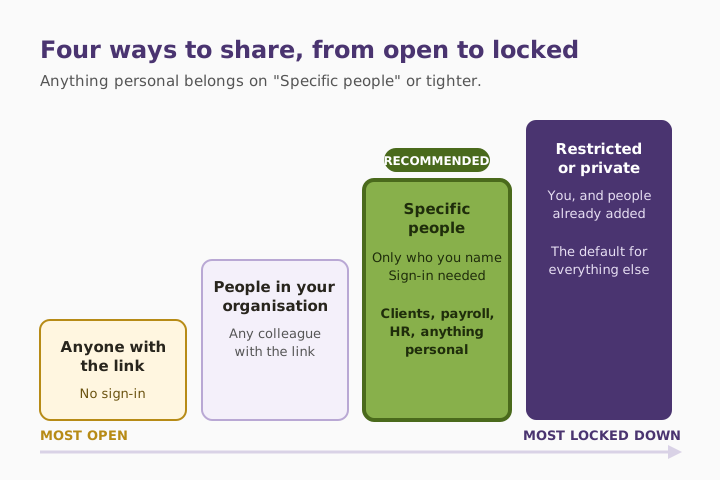
The sharing options compared
| Sharing option | Who can open it | Sign-in needed? | Use it for |
|---|---|---|---|
| Anyone with the link | Anyone who has the address | No | Public material only, with an expiry date |
| People in your organisation | Any colleague with the link | Yes | Internal documents that aren’t sensitive |
| Specific people | Only the people you name | Yes | Clients, payroll, HR, anything personal |
| Restricted or private | You, and people already added | Yes | The default for everything else |
What this looks like locally
We work with accountancy practices, law firms, charities and manufacturers across Denton (M34), Ashton-under-Lyne (OL6), Stockport (SK1) and Trafford (M33). Every time we run a sharing report, we find the same thing: a long list of open links, mostly harmless, and one or two that make the room go quiet. Finding them takes minutes. Explaining one to a client takes much longer.
Frequently asked
What does “anyone with the link” mean?
Anyone who has the file’s address can open it without signing in. You won’t see who they are, and access lasts until you change the setting or the link expires.
Is an “anyone” link the same as making a file public?
Not quite. The file won’t appear in search results unless the link is posted somewhere public. But once the link is passed on, so is access, and you won’t see it happen.
Do sharing links expire on their own?
Only if someone sets them to. In Microsoft 365, admins can require “anyone” links to expire and, from March 2026, set limits on internal links too. Neither is switched on by default.
How do I find everything I’ve shared?
In OneDrive, open the “Shared” view, or use “Manage access” on any file. In Google Drive, check each file’s Share settings under General access. In a business, your admin can run a tenant-wide sharing report.
What if I’ve already shared something sensitive?
Switch the link off straight away. Then work out who may have received it. If personal data could have been exposed, you may need to assess whether it’s reportable to the ICO.
What happens to a leaver’s shared links?
They can keep working after the person has left. Review sharing as part of every staff leaver process.
“A shared link is a spare key. The question isn’t who you gave it to, it’s who they gave it to.” — Brett Casterton, Inology IT
Close the links nobody needs.
I’m Brett at Inology IT. We’ll run a sharing report on your Microsoft 365, close the links nobody needs, and set safer defaults so the list doesn’t grow back. Drop your details below and I’ll come back to you the same day.
Last reviewed by Brett Casterton, October 2026.