Your phone is a key: how to lock it, find it and wipe it

Last week we covered QR code scams and the sticker that sends you somewhere it shouldn’t. This week is about the device you’d be scanning it with — and what happens the day you put it down and don’t pick it back up.
Twenty minutes on a forecourt counter
A Greater Manchester distribution firm called us after one of their drivers left his phone on a forecourt counter during a run. He noticed twenty minutes later. It had already gone.
The handset itself was a few hundred pounds. What sat on it was worth considerably more: company email, the delivery scheduling app, a list of customer addresses, and a WhatsApp group where the depot posted each day’s runs.
The phone had a screen lock, which helped. But nobody in the business had any way to locate it, lock it properly, or wipe the work data off it.
We spent the afternoon changing passwords, revoking sessions and working out exactly what had been visible on the lock screen. Then we set up the thing that should have existed already — a way to wipe work data from a phone remotely, without touching the driver’s personal photos.
None of that was expensive or complicated. It just had to be done before the phone went missing, not after.
A phone is rarely the expensive part of a lost phone. The accounts signed in on it are.
Why this matters
- The Met recorded 62,029 mobile phone thefts and robberies in the year ending August 2026, down 20% on the previous year but still roughly 170 a day. BBC News (2026): How the ‘largest phone smuggling network’ was uncovered by the Met.
- Phone theft is now organised rather than opportunistic: police uncovered a single smuggling network that moved up to 40,000 handsets, around 40% of all devices stolen in London over that period. BBC News (2026).
The fix
Apple is explicit about this: to erase a device remotely, Find My has to be turned on before it’s lost (Apple Support: erase a device in Find My). Android’s equivalent has its own conditions too — the phone needs to be switched on, signed in to a Google account, connected to mobile data or Wi‑Fi, with location and the find feature enabled.
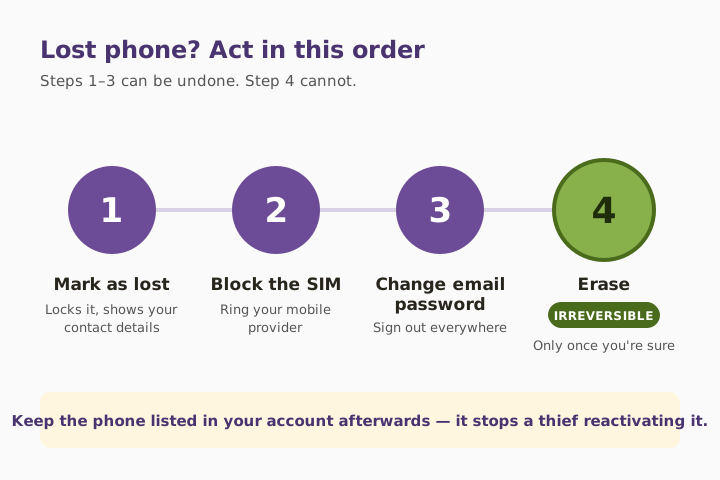
There’s also an order to follow. Mark the device as lost first. That locks it, suspends cards and displays a contact message on the lock screen, while still letting you track it. Only erase when you’ve genuinely given up on recovery, because an erase can’t be undone. And don’t remove the device from your account afterwards — keeping it there stops someone else activating it (Apple Support: if your iPhone has been stolen). The NCSC’s device security guidance covers the same ground for organisations managing a fleet.
Three quick wins you can act on this week
🏠 At home
Open Settings and check three things: the find-my-phone feature is on, the screen locks after the shortest sensible period, and your PIN isn’t a birthday, a postcode or a simple run of digits. Add fingerprint or face unlock so the short timer isn’t annoying enough to make you turn it off again.
🏢 At work
Decide what happens when a staff phone goes missing, and write it down. If people read company email on personal handsets, you need a way to remove just the work data remotely without wiping someone’s family photos. Make sure more than one person knows how to trigger it. We usually set this up alongside managed IT support.
🌍 For everyone
Learn the sequence before you need it: mark as lost, contact your bank and mobile provider, change your email password, then erase only once you’re sure. Keep the device listed in your account afterwards.
What to do in the first hour
- Use another device to mark the phone as lost, which locks it and shows your contact details.
- Ring your mobile provider to block the SIM.
- Change your email account password, then sign out of active sessions everywhere.
- Tell your bank, especially if the phone held a banking app or payment cards.
- Report the theft to the police and get a crime reference number.
- Erase remotely once recovery looks unlikely — and leave the device in your account.
Lock, find and wipe: what each one does
| Action | What it achieves | Set up in advance? | Reversible? |
|---|---|---|---|
| Screen lock and short timer | Stops casual access in the first minutes | Yes | N/A |
| Find My / Find Hub location | Shows where the device is | Yes | N/A |
| Mark as lost | Locks device, shows contact message, keeps tracking | Yes | ✅ Yes |
| Remote erase | Removes personal data from the handset | Yes | ❌ No |
| Work-data-only wipe | Removes company email and files, leaves personal data | Yes, via management tooling | ❌ No |
| Removing device from account | Nothing useful — makes activation easier for a thief | N/A | ⚠️ Avoid |
What this looks like locally
We look after distribution firms, manufacturers, accountancy practices and charities across Denton (M34), Ashton-under-Lyne (OL6), Stockport (SK1) and Trafford (M33), and a fair number of their staff read work email on their own phones. The gap is almost never the screen lock. It’s that nobody has agreed, in advance, who can wipe what — so the first hour after a loss gets spent working that out instead of acting.
Frequently asked
How do I find my lost phone?
On an iPhone, use the Find My app on another Apple device or go to iCloud.com/find. On Android, use Find Hub signed in to the same Google account. Both need to have been enabled beforehand.
Can I wipe my phone remotely if I didn’t set anything up?
Generally no. Apple requires Find My to be on before the device is lost, and Android’s equivalent needs the phone signed in with the feature and location enabled.
Should I wipe my phone straight away?
Not immediately. Mark it as lost first — that locks it and displays a contact message while you can still track it. Erase only when you’ve accepted you won’t get it back, because the erase can’t be undone.
Should I remove the phone from my account after wiping it?
No. Leave it listed. Removing it can make the handset easier for someone else to set up and use.
How quickly should my screen lock?
Around thirty seconds of inactivity is a sensible target, with a PIN that isn’t a date of birth, postcode or obvious sequence. Face or fingerprint unlock makes a short timer painless.
What about a personal phone with work email on it?
That’s a business decision, not just a personal one. You need the ability to remove company data without touching personal content — and an agreed process for who does it. It matters more now that phones hold passkeys for work sign-in.
“Everything that saves you when a phone goes missing has to be switched on while the phone is still in your pocket.” — Brett Casterton, Inology IT
Put the unglamorous bits in place before you need them.
I’m Brett at Inology IT. We help Greater Manchester businesses put the unglamorous bits in place — remote wipe for work data, a written process, and staff who know the first three steps. Drop your details below and I’ll come back to you the same day.
Last reviewed by Brett Casterton, October 2026.