Phishing emails: the five-second pause that saves you

Last week, we looked at closing old accounts and removing access when people leave. This week is about the most common way criminals try to get access in the first place: a convincing message that asks you to hurry. The message may look like it came from your bank, a delivery company, Microsoft, your boss or a trusted supplier. That does not mean it did.
“We’ve changed banks. Please use these details for all future invoices.”
A Greater Manchester manufacturer called us after a familiar supplier apparently sent new bank details for an upcoming payment. The email used the supplier’s logo, the normal contact name and a believable explanation.
It was tidy, polite and urgent.
The finance team nearly changed the payment record. Then someone followed the one rule that matters: they called the supplier using the number already saved in their system, not the number in the email.
The supplier knew nothing about it.
The email was phishing. The criminal had copied branding and wording from the supplier’s real messages, hoping that a busy person would make the change before asking a question.
This is the modern version of phishing. It is not always riddled with spelling mistakes. It can be polished, personal and completely plausible. At home, it might be a delivery text or banking alert. At work, it is more likely to be an invoice, a payroll request, a Microsoft 365 sign-in page or a message pretending to be the boss.
The answer is not panic. It is a pause and an independent check — using a channel the message itself did not choose for you.
Why this matters
- Consumer: The NCSC advises people who receive a suspicious email or message not to click links or open attachments. Instead, visit the organisation’s website independently or use its official app to check whether the request is real. NCSC: Suspicious email and message reporting.
- Business: Phishing was the most common type of cyber attack in the UK Government’s latest Cyber Security Breaches Survey, affecting the vast majority of businesses that identified an attack — making it the single most reported form of cyber breach. UK Government: Cyber Security Breaches Survey.
The fix
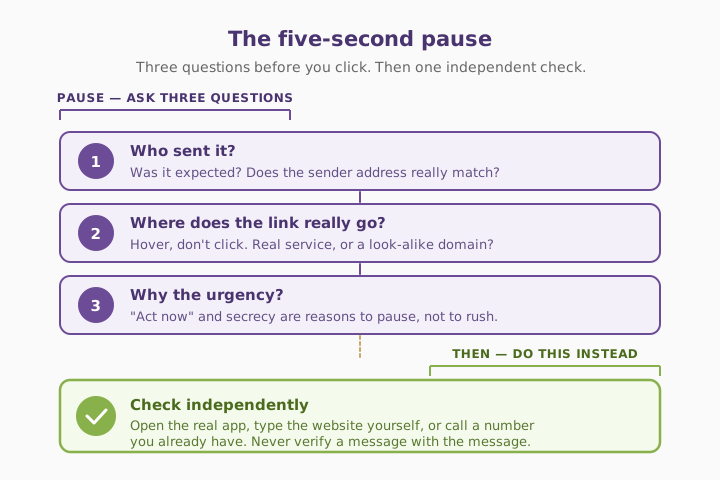
The simplest defence is an independent check. Do not click the link in the email or text. Open the real app, use a bookmarked website, type the address yourself, or call a phone number you already hold. For payment or bank-detail changes, use a verified callback process every time.
Three quick wins you can act on this week
🏠 At home
Treat unexpected delivery, bank, HMRC, streaming-service and password-reset messages with caution. Do not tap the link. Open the app or type the company’s website yourself to check the account. Never give a one-time security code to someone who contacts you first.
🏢 At work
For a request to change supplier bank details, make a payment, buy gift cards or share data, call the person or supplier on a number already in your records. Do not reply to the email, and do not use a number included in the request.
🌍 For everyone
Check three things before you act: who sent it, where the link really goes, and why it needs doing now. Urgency, secrecy, unusual payment instructions and unexpected logins are reasons to pause, not reasons to rush.
What to do when a message looks off
Honest comparison — the message patterns we see most often, and the safest response to each.
| Message behaviour | Likely safe? | What to do |
|---|---|---|
| You expected it and can confirm it in the official app | ✅ Usually | Check normally and proceed carefully |
| An unexpected message asks you to log in | ⚠️ Maybe phishing | Open the service yourself; do not use the link |
| A supplier requests new bank details by email | ⚠️ High risk | Call an existing, trusted number to verify |
| A message asks for a one-time code or password | ❌ No | Do not share it; report or delete the message |
| “Act now or your account will close” | ⚠️ Common pressure tactic | Pause and check independently |
| A boss asks for gift cards, payment or sensitive data unusually | ⚠️ High risk | Verify face-to-face or through a trusted channel |
What this looks like locally
We help manufacturers, accountancy practices, law firms and professional-services teams across Denton (M34), Ashton-under-Lyne (OL6), Stockport (SK1) and Trafford (M33) build simple verification rules for suspicious messages. The most effective rule is also the least technical: no change to payment details, no unexpected login request and no urgent data-sharing request gets acted on without an independent check.
If you’d like this built into how your Microsoft 365 tenant is looked after — tighter email protection, safer supplier processes and practical phishing awareness for staff — it’s all part of a SecureState review.
Frequently asked
What is a phishing email?
It is a scam email designed to look genuine and persuade you to click a link, open an attachment, enter a password, send money or share information.
How can I tell if an email is phishing?
Look for unexpected urgency, requests for passwords or codes, unusual payment instructions, a sender address that is slightly wrong, and links that do not match the organisation. But do not rely only on spelling or grammar — modern scams can look polished. See NCSC guidance on spotting phishing.
What should I do if I click a phishing link?
Do not enter any information. Close the page, change the affected password from the real website, turn on MFA if it is not already enabled, and tell your IT provider or the organisation involved. If you entered bank details or made a payment, contact your bank immediately.
Can a real-looking Microsoft 365 email be a scam?
Yes. Criminals commonly imitate Microsoft 365 sign-in pages and password-expiry emails. Instead of using the email link, go to Microsoft 365 through your usual bookmark, browser address or office app. See Microsoft: secure your business data in Microsoft 365.
How do I check a supplier’s bank details safely?
Call a known contact using a number already on your supplier record. Do not reply to the request or use the phone number it contains. Ask them to confirm the change independently.
Should I forward suspicious emails to IT?
Yes. Report them using your organisation’s process. At home, delete or report them through your email provider, and forward suspicious messages to report@phishing.gov.uk — the UK Suspicious Email Reporting Service.
“A phishing email only needs you to trust it once. A five-second independent check can stop the whole scam.” — Brett Casterton, Inology IT
Let’s tighten your Microsoft 365 email protection — same day.
I’m Brett at Inology IT. We help Greater Manchester businesses tighten Microsoft 365 email protection, build simple supplier-verification rules and give staff practical phishing awareness that works in a busy day. Drop your details below and I’ll come back to you the same day.
Last reviewed by Brett Casterton, September 2026.