Microsoft 365 security basics: simple switches that stop most account hacks

This week's tip is the one I get asked about most often at radio drop-ins and coffee-shop chats around Greater Manchester: "We're on Microsoft 365 — that means we're secure, right?" The platform is strong. The default settings are not. Here's what to switch on, in the order that matters.
The £8,400 forwarded email
A Greater Manchester accountancy firm called us in earlier this year after one of their clients forwarded a very convincing email requesting payment to a "new" bank account. The email had come from a real staff mailbox at the firm — same signature, same footer, same friendly tone. The client paid £8,400 before anyone realised.
When we traced it back, it wasn't a clever exploit. It was one compromised mailbox: reused password, no multi-factor authentication, and a quiet forwarding rule the attacker had set up to hide the reply thread. The fix took half a day. Not fixing it could have lost the client relationship — and become a reportable incident.
The tenant itself was ordinary. Microsoft 365 Business Standard, decent internet, sensible people. The basics just weren't switched on: no enforced MFA, three global admins where there needed to be one, and default email protections that nobody had reviewed since the tenant was first set up.
Worth saying plainly: this firm wasn't one of ours. If they had been, MFA and admin separation would already have been in place — and the £8,400 email would never have got out.
Why this matters
- MFA blocks the overwhelming majority of automated account attacks — Microsoft's own analysis of billions of daily sign-ins shows multi-factor authentication stops around 99.9% of them. Microsoft Security Blog.
- 85% of UK businesses that suffered a breach in 2024 identified phishing as the root cause — a Microsoft 365 mailbox with default settings and no MFA is exactly the target these attacks are built for. Cyber Security Breaches Survey 2025, GOV.UK.
The fix
We package this pattern under Secure State™ — our name for the way we deploy the basics alongside device hardening, backup and monitoring. If you're doing it yourself, the checklist below is the right place to start.
Three tips you can act on this week
🏠 At home
Turn on 2-step verification on your personal Microsoft account (Outlook.com, OneDrive, Xbox) and stop reusing that password anywhere else. See our companion tip on password managers for the five-minute way to fix reuse across every account you own.
🏢 At work
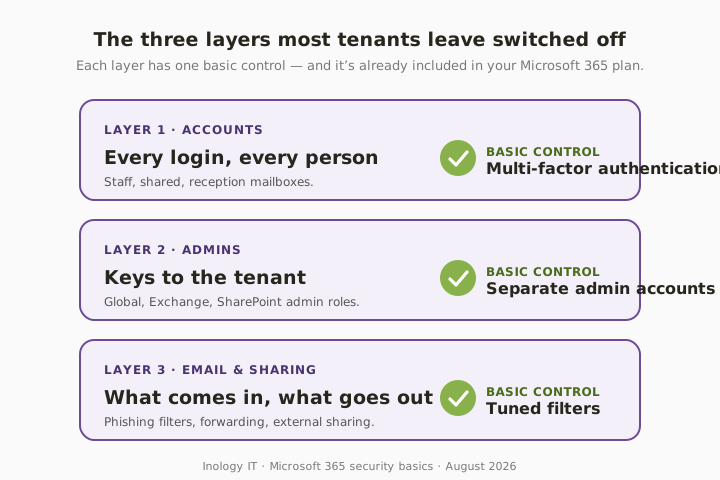
Ask your IT provider to confirm three things in writing: (1) MFA is switched on for every staff account, (2) admin roles are limited and use separate accounts from day-to-day mailboxes, and (3) the built-in phishing and malware filters have been reviewed and tuned. If any answer is "we haven't checked", that's your next job.
🌍 For everyone
Write down your joiners and leavers checklist: how an account is created, how it's fully removed when someone leaves, how devices are added and wiped, and a quarterly review of who holds admin rights. Most breaches we investigate start with an account that should have been closed months ago.
How much protection do you actually have?
Honest comparison — this is what we see across small-business tenants in Greater Manchester.
| Setup | Protection level | Effort | Realistic for you? | Typical firm |
|---|---|---|---|---|
| Defaults only | Low | None | ❌ | Very small firms, no IT support |
| MFA on staff, mixed admin accounts | Medium | One-off setup | ⚠️ | Typical small business today |
| MFA + separate admin + tuned filters | High | A couple of hours | ✅ | 5–50 staff businesses |
| Fully managed M365 security (incl. Conditional Access) | Highest | Mostly outsourced | ✅ | Firms that want oversight and evidence |
What this looks like locally
We look after accountancy practices, legal firms and manufacturers across Tameside, Stockport and Manchester. The pattern is almost always the same: good intentions, modern cloud tools, default settings, and unclear rules about who has admin. The Microsoft 365 basics aren't glamorous — but they're the single biggest lift most small businesses can make in an afternoon.
If you'd like a wider view of how these controls line up with the UK standards buyers ask about, see our Cyber Essentials and Microsoft 365 support pages.
Frequently asked
What does "Microsoft 365 security basics" actually mean?
It means using the protections you already pay for inside your Microsoft 365 subscription: multi-factor authentication on every account, separate and locked-down admin logins, sensible email and sharing rules, and a clear joiners/leavers process. You don't need extra software to be safer — you need the default tools switched on properly.
Is Microsoft 365 secure enough by default for a small business?
The platform is strong, but the default settings aren't tuned for how a small business actually works. MFA isn't always enforced, admin accounts often double as everyday mailboxes, and phishing/malware filter defaults are never reviewed. Most of the M365 incidents we see happen inside perfectly ordinary tenants that never had the basics turned on.
Do I need multi-factor authentication on every account?
Yes. Microsoft's own research shows MFA blocks the overwhelming majority of automated account attacks. Every staff mailbox — including shared and reception mailboxes with a login — should have MFA enforced. It takes a few minutes per user to set up and prevents the single most common route into a small-business tenant.
What's wrong with using one admin account for everything?
If your day-to-day mailbox is also a global admin, one successful phishing email hands the attacker the keys to the whole tenant — every mailbox, every SharePoint site, every Teams chat. Admin work should happen through separate, MFA-protected accounts that don't send or receive email and aren't used to browse the web.
How long does it take to turn these basics on?
For most Greater Manchester small businesses, an hour with whoever looks after your tenant is enough to switch on MFA, separate the admin accounts and review the email filter defaults. Rolling out the joiners/leavers process and a quarterly admin review is a further afternoon of work. It's not a big project — it just has to actually happen.
Do I need expensive add-ons to be safer in Microsoft 365?
No. The basics — MFA, separate admin accounts and tuned email filters — are included in every standard Microsoft 365 Business plan. Add-ons like Defender or Conditional Access are useful once the basics are in place, but they don't compensate for a tenant that never had them switched on.
"The scariest Microsoft 365 incidents I see don't come from clever new attacks. They come from perfectly ordinary tenants that never switched on the basics they already pay for." — Brett Casterton, Inology IT
I'll take a proper look — same day.
I'm Brett at Inology IT. We run quick Microsoft 365 security reviews for Greater Manchester businesses — we'll show you which basics are already switched on, where the gaps are, and how fast we can close them without disrupting staff. Drop your details below and I'll come back to you the same day.
Last reviewed by Brett Casterton, August 2026.