Paying safely online: why the way you pay matters as much as where

Last week we covered the first hour after something goes wrong. This week moves one step earlier: the moment you press “pay”, and the two protections that decide whether you’ll get your money back if something isn’t right.
The invoice that looked right
A Greater Manchester distribution firm called us in last month after paying £14,200 to a supplier who never received it.
The invoice arrived from what looked like the supplier’s usual address, with the usual logo and a polite note that their bank details had changed. Their finance assistant entered the new details into the banking app, and a warning appeared: the name on the account didn’t match.
She’d seen that kind of warning before, usually because a supplier’s trading name differs slightly from its registered one. So she tapped continue. The money landed in an account belonging to someone else entirely.
Nobody was careless. The warning looked like the false alarms she’d learned to click past. What the business didn’t have was a rule saying what a mismatch should trigger.
We helped them put one in place that afternoon: any “no match” or “close match” on a new payee means a phone call, on a number already on file, before a penny moves. It costs nothing, and it would have saved £14,200.
Why this matters
Purchase scams, where people pay for goods or services that never arrive, made up 71% of all authorised push payment fraud cases in 2025, with losses up 20% to £118.1 million (UK Finance, 2026).
Businesses are targeted too. Business accounts lost £75.6 million to authorised push payment fraud across 7,504 cases in 2025 (UK Finance Annual Fraud Report, 2026).
The fix
Confirmation of Payee is a name check your bank runs when you pay someone new, comparing the name you’ve entered with the name on the receiving account before the money leaves.
You’ll see one of a few responses. “Match” means the name lines up. “Close match” means it’s nearly right, perhaps a spelling difference or a personal account where you expected a business one, and your bank will usually show you the real name. “No match” means the name is different, which can mean the account belongs to a fraudster.
Your bank will normally still let you carry on. But if you continue past a “no match” and it turns out to be a scam, getting the money back becomes much harder.
The second protection is how you pay. Under Section 75 of the Consumer Credit Act, if you pay for something with a credit card and its cash price is over £100 and no more than £30,000, the card provider is jointly liable with the seller if it isn’t delivered, is faulty or isn’t as described. That’s true even if only the deposit went on the card. Debit cards don’t carry Section 75, although your bank may be able to help through chargeback. A bank transfer has neither.
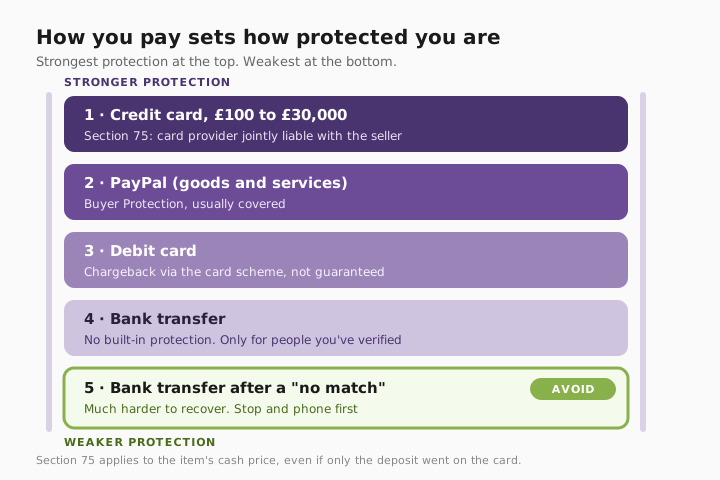
For a business, the fix is a payment process, not a product. That’s part of how we harden a business’s day-to-day defences through Secure State.
Three quick wins you can act on this week
🏠 At home
Pay for anything costing more than £100 on a credit card, even if you clear the balance straight away. Section 75 covers you if the seller vanishes, goes bust or sends something that isn’t as described. Pay the bill in full each month and the protection costs you nothing.
🏢 At work
Write down one rule for finance staff: a “no match” or “close match” on a new or changed payee means stop, phone the supplier on a number already on file, and only then pay. Pair it with the bank-details check from our email rules tip. Fraudsters often change the details first, and the mismatch is the clue.
🌍 For everyone
Never pay someone you don’t know by bank transfer, especially on marketplaces and social media. If a seller insists on a transfer, offers a discount for one, or wants you to use “friends and family” on PayPal, walk away.
How to pay someone new safely
- Check the name on the account. When you pay someone new or a supplier’s details change, read the Confirmation of Payee result before anything else.
- Stop on “no match” or “close match”. Don’t tap continue. A mismatch on a new or changed payee is the clue that something isn’t right.
- Phone the supplier on a number you already have. Use the number on file or a previous invoice, never one from the email that asked you to change the details.
- Choose the payment method with protection. Over £100? Use a credit card so Section 75 applies. For marketplaces, use PayPal goods and services. Avoid bank transfers to people you don’t know.
- Keep the confirmation. Save the Confirmation of Payee result and the invoice. If something goes wrong, they help your bank and your card provider act quickly.
How payment methods compare
| How you pay | If goods never arrive | If it was a scam | Best for |
|---|---|---|---|
| Credit card (£100 to £30,000) | Section 75: card provider jointly liable | Strong route to a refund | Online purchases, deposits, holidays |
| Credit card (under £100) | Chargeback, not guaranteed | Chargeback, not guaranteed | Smaller purchases |
| Debit card | Chargeback, not guaranteed | Chargeback, not guaranteed | Everyday spending |
| PayPal (goods and services) | PayPal Buyer Protection | Usually covered | Marketplace purchases |
| Bank transfer | No built-in protection | Depends on circumstances | People and businesses you’ve verified |
| Bank transfer past a “no match” | No built-in protection | Much harder to recover | Avoid |
What this looks like locally
We help businesses across Denton (M34), Ashton-under-Lyne (OL6), Stockport (SK1) and Trafford (M33) put payment checks in place, including distributors, manufacturers, accountancy practices and charities. The process is nearly always missing, not the technology. Most finance teams have seen a Confirmation of Payee warning. Very few have agreed what it should trigger. You’ll find more like this in our Weekly Tech Tips.
Frequently asked
What does “no match” mean on Confirmation of Payee?
The name you entered doesn’t match the name on the account you’re paying. Check you typed it correctly, then contact the person or business on a number you already have before going ahead.
What’s a “close match”?
The name is nearly right, perhaps a spelling difference or a personal account where you expected a business one. Your bank will usually show you the actual name. If you weren’t expecting the difference, check before paying.
Is it safer to pay by credit card or debit card?
For purchases over £100, credit card. Section 75 makes the card provider jointly liable with the seller. Debit cards rely on chargeback, which is a card scheme process, not a legal right.
Does Section 75 work if I only paid the deposit on a credit card?
Yes. It depends on the item’s cash price being over £100 and no more than £30,000, not on how much you put on the card. You can be covered for the full amount.
Will my bank refund me if I’m scammed by bank transfer?
It depends on the circumstances, including whether you ignored warnings like a Confirmation of Payee “no match”. Contact your bank immediately. We’ll cover who to report to, and what happens next, in next week’s tip.
Why would a seller only want a bank transfer?
Often because it gives you the least protection. A legitimate seller will usually accept a card or a protected payment method. Treat transfer-only as a warning sign.
“Your bank’s trying to tell you something. Let it finish the sentence.” — Brett Casterton, Inology IT
A warning should trigger a phone call, not a click.
I’m Brett at Inology IT. We’ll help your finance team put a simple payment-checking rule in place, tighten how supplier bank details get changed, and make sure a Confirmation of Payee warning triggers a phone call, not a click. Drop your details below and I’ll come back to you the same working day.
Last reviewed by Brett Casterton, November 2026.