The first hour after something goes wrong: what to do, in order

Last week we covered Cyber Essentials, the basics that stop most attacks. This week is about what to do when something gets through anyway, and why the first hour shapes everything after it.
8:20 on a Monday morning
A Greater Manchester recruitment firm called us at 8:20 on a Monday morning. Their office manager had arrived to find every file on the shared drive renamed with an unfamiliar extension, and a message on screen demanding payment.
What happened next is what usually happens, and none of it was anyone’s fault. One person restarted the affected PC to see if that would clear it. Another opened files on the shared drive one after another to check whether they still worked. Two consultants, trying to help, logged in from home to see whether their own machines were affected.
Every one of those things made the job harder. The restart threw away information about what was running. Opening files from other machines risked spreading the problem. Each extra login was one more session we then had to check and close.
When we arrived, we disconnected the affected machines from the network, made sure the backups were safely cut off from everything else, and started a log with timestamps. Then we worked out what had been touched.
They were back up from backups by Wednesday, and nothing was paid. The conversation afterwards wasn’t about technology. It was about the piece of paper they wished they’d had in a drawer that Monday.
Why this matters
The government’s Cyber Security Breaches Survey 2025/26 found that 43% of UK businesses identified a breach or attack in the previous 12 months. Only 25% have a formal incident response plan, falling to 21% among micro businesses (GOV.UK, 2026).
If personal data is involved, the clock starts when you become aware. Notifiable breaches must be reported to the ICO without undue delay and within 72 hours, and the ICO advises starting a log immediately, even before you know whether you’ll need to report (ICO, 2026).
The fix
Instinct pushes the other way. People want to restart the machine, delete the strange email, or keep clicking to see what still works. Those instincts feel helpful, but they spread the problem and destroy the evidence your IT provider needs to understand what happened.
Containing an incident usually means disconnecting rather than switching off: unplug the network cable and turn off Wi‑Fi on the affected device, and leave it powered on and untouched. If money has moved, the bank comes first, because the sooner they know, the better the chance of stopping or recovering a payment.
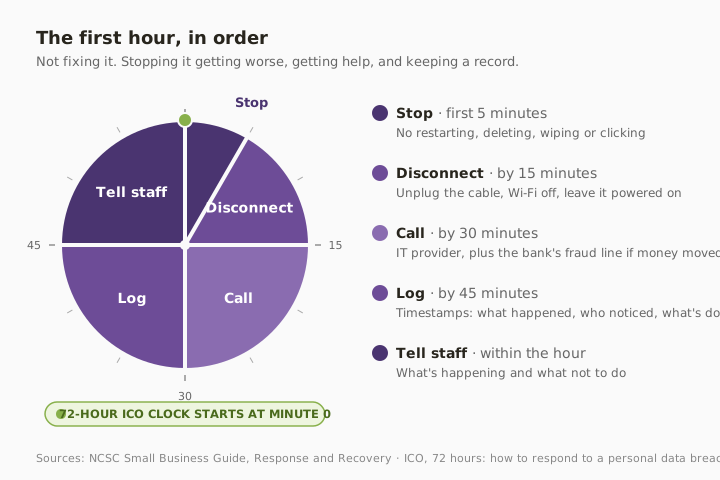
The NCSC’s response and recovery guidance is clear that preparation does most of the work. Know who to call before you need them, and keep that information somewhere that still works when your systems don’t. That’s one of the things we set up for clients as part of managed IT support.
Three quick wins you can act on this week
🏠 At home
If something on your computer or phone looks wrong, stop clicking. Take a photo of the screen with another device, disconnect from Wi‑Fi, and don’t wipe or reset anything until you know what you’re dealing with. If you’ve given away bank details, ring the number on the back of your card straight away.
🏢 At work
Write one page and print it: who’s in charge during an incident, your IT provider’s emergency number, your bank’s fraud line, your cyber insurer’s helpline, and the first five steps below. Keep a copy somewhere that isn’t on your network, because the document saved on a locked server is the one you can’t open.
🌍 For everyone
Start a written log the moment you notice something wrong: what you saw, the time, who you told and what you did. It helps your IT provider, your bank and your insurer, and if personal data is involved, the ICO will ask for it.
What to do in the first hour
- Stop and don’t make it worse. No restarting, deleting, wiping or clicking around.
- Disconnect affected devices from the network. Unplug the cable and turn off Wi‑Fi, but leave them powered on.
- Call your IT provider. If money has moved, ring your bank’s fraud line at the same time.
- Start a log with timestamps. What happened, who noticed, what’s been done.
- Tell staff what’s happening and what not to do. Including not logging in from home to check.
- Don’t pay any ransom or reply to any demand. Not until you’ve had expert advice.
- Note the time you became aware. If personal data might be affected, the 72-hour ICO clock starts there.
For specific situations, we’ve covered the detailed steps separately: a lost or stolen phone and a hacked email account.
Helpful instincts that make it worse
| What people do | Why it feels right | What to do instead |
|---|---|---|
| Restart or switch off the machine | “Turn it off and on again” | Disconnect from the network, leave it on |
| Delete the suspicious email or file | Get rid of the problem | Leave it, photograph it, tell IT |
| Keep opening files to see what works | Check the damage | Stop, because you may spread it |
| Log in from home to check | Trying to help | Stay off until IT says otherwise |
| Pay quickly to make it go away | Fastest fix | Get advice first, since paying guarantees nothing |
| Wait to see if it sorts itself out | Avoid overreacting | Call now, because time matters most in the first hour |
What this looks like locally
We get these calls from businesses across Denton (M34), Ashton-under-Lyne (OL6), Stockport (SK1) and Trafford (M33), and the first five minutes of the conversation are nearly always the same. Someone has already restarted something, and nobody’s sure who’s in charge. The businesses that recover fastest aren’t the ones with the most expensive technology. They’re the ones with a plan someone has actually read.
Frequently asked
What should I do first if I think we’ve been hacked?
Stop using the affected device, disconnect it from the network without switching it off, and call your IT provider. If money has moved, ring your bank’s fraud line at the same time.
Should I turn the computer off?
Usually not. Disconnecting from the network contains the problem, and leaving the device on preserves information that helps your IT provider work out what happened. Follow their advice from there.
Should we pay a ransom?
Not without expert advice. Paying doesn’t guarantee you’ll get your data back or that it won’t be leaked, and it marks you as willing to pay. Good backups are what make refusing a realistic option.
Do I have to report it?
Possibly, and to more than one place. If personal data is involved and there’s a risk to people, the ICO must be told within 72 hours of you becoming aware. Fraud and cyber crime should be reported too. We’ll cover exactly who to tell, and what happens next, in a couple of weeks.
What if the attack is still happening?
Organisations suffering a live cyber attack can call the NCSC’s incident line on 0300 123 2040, alongside contacting their IT provider.
What should an incident plan include?
For most small businesses, one page: who’s in charge, emergency contacts for IT, the bank and your insurer, the first steps in order, and where your backups are. Print it, and test it once a year.
“Panic is not a plan. A piece of paper in a drawer is.” — Brett Casterton, Inology IT
One page. Printed. In a drawer.
I’m Brett at Inology IT. We’ll help you write a one-page incident plan that fits your business, check your backups would actually get you running again, and be the number at the top of that page. Drop your details below and I’ll come back to you the same day.
Last reviewed by Brett Casterton, October 2026.