Backups and the 3-2-1 rule: how to never lose a file again

Last week we covered multi-factor authentication — the front door. This week's tip is the safety net behind it: backups. Because the locks don't always hold, and when they don't, this is what saves you.
The wedding photos and the £40,000 server
A Greater Manchester law firm called us in last month after the worst Monday of their working lives. Over the weekend, ransomware had crept in through an old remote-access account and encrypted everything — client files, case histories, accounts, the lot. The criminals wanted £40,000.
They weren't reckless. They had a backup. But it was a hard drive plugged into the same server, so when the ransomware spread, it took the backup with it. With no clean copy to restore from, and clients waiting, they paid — and still lost four days.
Here's the thing — it's the exact same mistake my neighbour made with her wedding photos. One copy, on one laptop. The laptop died, and twelve years of memories went with it.
Whether it's a law firm's case files or your child's first steps, the rule is identical, and IT people live by it: 3-2-1. Three copies of anything precious. On two different types of storage. With one kept somewhere completely separate — the cloud, or off-site.
Worth saying plainly: that law firm wasn't one of ours. If they had been, a proper off-site, immutable backup would have been switched on from day one — and that Monday morning phone call would never have happened.
Why this matters
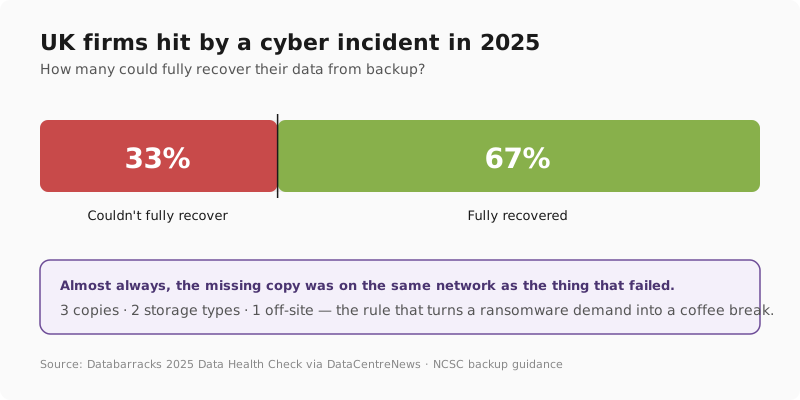
- A third of UK firms hit by an incident couldn't fully recover their data from their backups. Almost always, it's because the only backup sat right next to the thing that failed. Databarracks 2025 Data Health Check via DataCentreNews.
- Years of irreplaceable family photos are routinely lost to a single failed or lost device. Cloud-user forums in 2025 are still full of reports of entire date ranges of photos vanishing with no warning — underlining why one copy is never enough. Google Photos help community reports, 2025.
- The UK's National Cyber Security Centre is unambiguous: every business should have backups, kept separate from live systems, and tested regularly. NCSC: Backing up your data.
The fix
The fix at home is automatic cloud backup for your phone, plus an external drive and a cloud service for your computer. The fix at work is making sure at least one backup lives somewhere your main network can't touch — and that you've tested a restore recently enough to trust it. We deliver this as part of our cloud backup and disaster recovery service, alongside Secure State and managed IT support.
Three things you can do this week
🏠 At home
Turn on automatic cloud backup for your phone today — iCloud Photos on iPhone or Google Photos on Android. For your computer, an external drive plus a cloud service (OneDrive, Google Drive, Backblaze) gives you the other two copies. Set it once and forget it. Combine with the password manager habit from three weeks ago and you've covered the essentials.
🏢 At work
Ask the one question that matters: is at least one backup kept somewhere your main network can't reach? A drive plugged into the same server gets encrypted too. Use an isolated, ideally immutable, off-site or cloud backup — and test a restore every quarter. We deliver this as part of cloud backup and disaster recovery, layered on top of Secure State.
🌍 For everyone
Memorise 3-2-1. Three copies of anything you can't bear to lose. Two different types of storage. One kept somewhere else entirely. Same rule for a wedding album and a 50-person company. If you can't tick all three for something precious, that's this week's job.
Which backup approach is enough?
Honest comparison — we've set up all of these for different clients.
| Backup approach | Copies | Off-site? | Survives ransomware? | Good for |
|---|---|---|---|---|
| Nothing (hope) | 1 | ❌ | ❌ | No one |
| External drive only | 2 | ❌ | ❌ if always connected | Bare minimum at home |
| Cloud sync (iCloud / OneDrive) | 2 | ✅ | ⚠️ sync can spread damage | Home photos & documents |
| 3-2-1 with cloud | 3 | ✅ | ✅ | Homes that care, all businesses |
| 3-2-1 with immutable off-site | 3+ | ✅ | ✅ best | Any business with client data |
What this looks like locally
We've set up proper 3-2-1 backup for businesses across Tameside, Stockport, Oldham, Trafford and right across Greater Manchester — and we've sat with more than one local family helping them recover photos from a dead laptop. The pattern's always the same: the people who call us before something fails sleep fine; the ones who call after have usually lost something they can't get back.
For an example of how this thinking plays out when something does go wrong, see our walkthrough of good incident response in a 20-person business.
Frequently asked
What is the 3-2-1 backup rule?
Three copies, two storage types, one off-site or in the cloud. No single failure — a dropped phone, a dead hard drive or a ransomware attack — can wipe out every copy at once. It's been the gold-standard advice from IT teams for decades, and the NCSC still recommends it for UK small businesses today.
How do I back up my phone photos?
On iPhone, turn on iCloud Photos in Settings. On Android, turn on Google Photos backup. Both keep an off-device copy of every photo and video automatically, so a lost or broken phone doesn't take your memories with it. Worth checking once a year that backup is still switched on — phone updates occasionally turn it off.
Is cloud storage the same as a backup?
Not quite. Cloud sync (OneDrive, Google Drive, iCloud Drive) mirrors files between your device and the cloud — so if you delete a file, or ransomware encrypts it, that change syncs everywhere. A true backup keeps separate, recoverable versions you can roll back to. Use both: sync for working files, plus a proper backup for the worst day.
Will a backup protect me from ransomware?
Only if at least one backup is isolated from your main network. Ransomware encrypts everything it can reach — including connected backup drives. Off-site, offline or immutable backups are what actually save a business when the worst happens. Without one of those, a "backup" is just another file the criminals can lock.
How often should I back up?
Phones and home PCs: automatic daily backup is plenty. Businesses: continuous or daily backup of business-critical systems, with a tested restore every quarter so you know it actually works when you need it. An untested backup is a hope, not a plan.
Do I really need three copies?
Two copies in one place survive a single drive failure — but not fire, theft or ransomware. The third off-site copy is what saves you from anything that hits one location. For a few pounds a month, it's the cheapest insurance policy in IT.
"I've never once heard someone say they regretted backing up. But I've sat across the desk from people who lost twelve years of photos, and a firm that lost four days and forty grand. The rule is the same for both: three, two, one." — Brett Casterton, Inology IT
Let's test that.
I'm Brett at Inology IT. We'll check whether your business has a real off-site, ransomware-proof backup — and test that it actually restores. Most businesses think they're covered until we run the test.
Last reviewed by Brett Casterton, June 2026.